Installation
npm exec @deepseek-ai/dsh webThis command is generated from the GitHub repository address. Inspect the upstream README and source before running it; pin a release or commit when reproducibility matters.
README
Maintainer-authored documentation snapshot.
dsh-my-plugins
DeepSeek Harness(DSH)网页插件:在 设置 → 插件 中增加「我的插件」页签,把你安装的插件按包级卡片集中管理,并提供版本查看、启停、更新检查与安全移除。
功能特性
- 将用户安装的插件聚合为一张卡片,过滤
cordis:include等系统伪模块。 - 双列卡片、搜索过滤、安装来源、插件介绍、配置状态与 Cordis 状态。
- 展开卡片后查看:
- 插件版本;
- 配置状态(已启用 / 已停用);
- Cordis 状态(已挂载、加载中、挂载失败等);
- 安装来源(本地、Registry、GitHub 上游);
package.json中的插件介绍。
- 插件管理操作:
- 启用插件 / 禁用插件:写入受管理的 profile patch 覆盖,页面自动刷新以同步浏览器半部;
- 检查更新 / 立即更新:支持 npm Registry 包和 GitHub 直接安装包;Registry 包同时显示可识别的 GitHub 上游 Release 信息;
- 移除插件:二次确认后调用 DSH CLI 移除依赖,并提示重启完成卸载。
- 更新操作在调用 pnpm 前检查 profile 内损坏的本地
file:/link:依赖,避免把无关依赖的ENOENT误报为目标插件更新成功。 - 中英文界面,跟随 DSH 当前界面语言。
界面预览
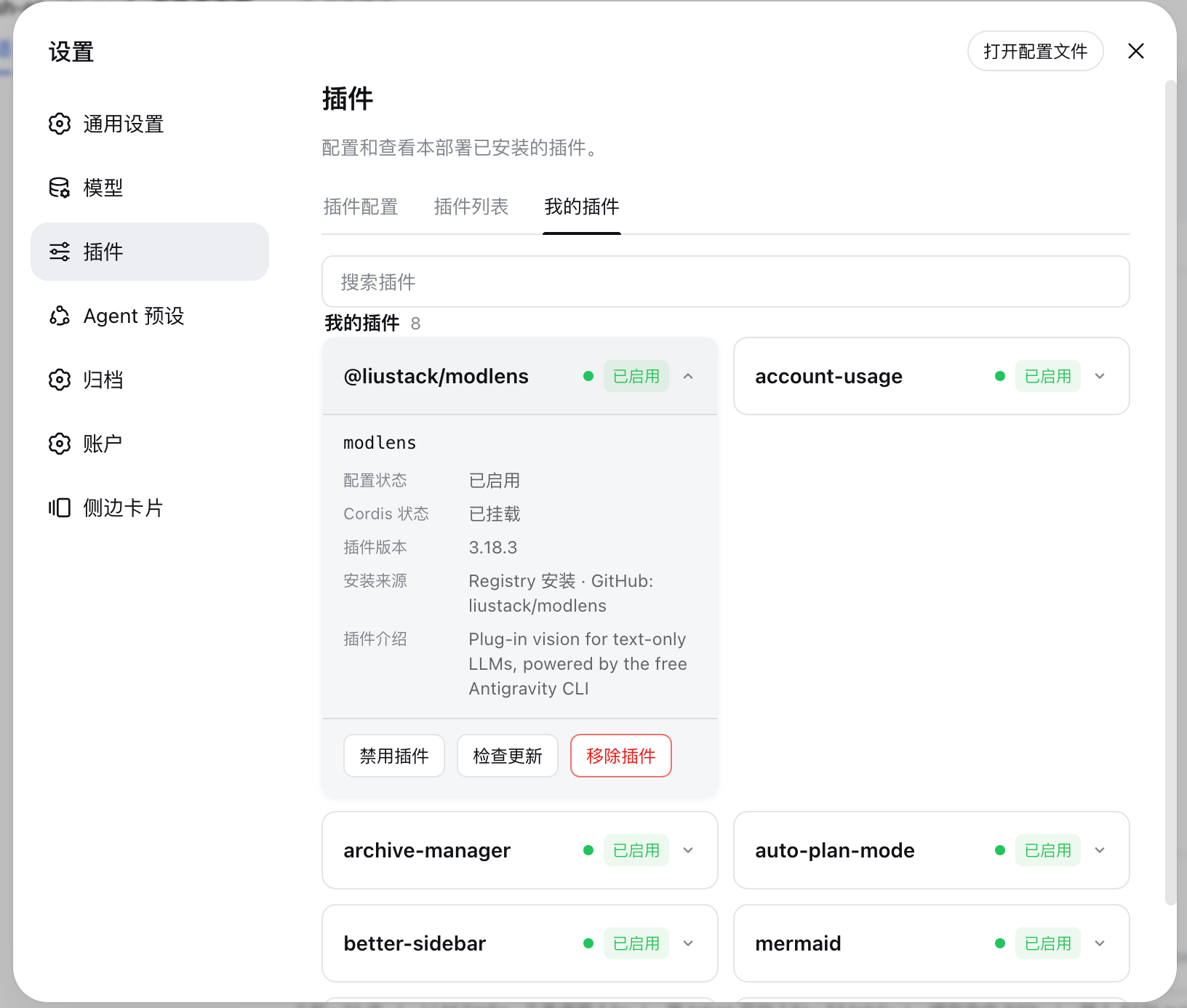
上图展示 DSH Web 的 设置 → 插件 → 我的插件 页面:搜索框、包级卡片、插件版本、安装来源、配置状态、Cordis 状态,以及禁用、检查更新、移除三个管理操作。
目录
安装
需要已安装 DSH CLI 与 pnpm;dsh plugin 会将命令转发给 pnpm。
# 从 GitHub 安装
dsh plugin --profile web add github:Ycet/dsh-my-plugins

# 本地 file: 快照安装(推荐本地开发完成后的安装方式)
dsh plugin --profile web add dsh-my-plugins@file:<absolute-path-to-plugin>
不建议用
link:作为长期安装方式:它依赖源码目录位置。file:安装会将包作为 profile 快照安装;修改源码后,需重新执行安装命令同步副本。
本包通过 package.json 中的 dsh.bundle.patch 声明和 cordis.patch.yml 自动加入 profile bundle 层,无需手动编辑配置。
安装或升级后,重启 DSH Web:
npm exec @deepseek-ai/dsh web
使用方法
- 启动或重启 DSH Web,打开
http://127.0.0.1:3080。 - 进入 设置 → 插件 → 我的插件。
- 使用搜索框过滤插件,点击卡片展开详情。
- 选择对应操作:
- 启用 / 禁用:成功后页面自动刷新;
- 检查更新:有可安装更新时按钮变为蓝色「立即更新」;
- 移除:弹出二次确认,确认后按提示重启 DSH Web。
更新与移除
更新来源规则
| 来源 | 检查更新 | 更新行为 |
|---|---|---|
| npm Registry | 支持,检查 npm latest | 显式安装目标版本,避免 0.x semver 范围不跨 minor 的假成功 |
| GitHub Git spec | 支持,检查分支 commit / 上游信息 | 使用 DSH CLI 更新并验证安装后的 commit / 版本 |
本地 file:、link:、tgz | 置灰 | 不自动更新,避免覆盖本地源码或快照 |
| 手工 patch-only 条目 | 置灰 | 不自动更新 |
如果 profile 中任意本地 file: / link: 依赖指向的目录或 tgz 已丢失,pnpm 会阻断整个依赖图的更新。本插件会先显示明确的依赖健康提示;请先修复失效依赖来源,再更新目标插件。
启停状态
启停状态写入 profile 的 cordis.patch.yml 中由本插件维护的区块,不会重排或覆盖手工 patch。DSH HMR 会更新 Host Loader;浏览器页面随后自动刷新,使浏览器半部同步。
工作原理
flowchart LR
    A[浏览器半部 lib/client.js] -->|POST /my-plugins/api/*| B[宿主半部 lib/index.js]
    B --> C[读取 Loader 条目与 profile manifest]
    C --> D[聚合包级元数据、版本与来源]
    D --> E[启停 / 更新检查 / 更新 / 移除]
    E --> F[profile patch 或 DSH CLI / pnpm]
    F -->|JSON 与状态提示| A
- 宿主半部:lib/index.js 注册受同源与回环信任围栏保护的
/my-plugins/api路由;负责枚举 Loader、解析 profile 依赖、版本与来源、执行更新预检及管理动作。 - 浏览器半部:lib/client.js 向
settings.plugins.tab注册「我的插件」页签,向shell.overlay注册 toast,并通过顶层 Portal 显示位于设置窗口上方的移除确认弹窗。 - 组合层:cordis.patch.yml 插入单个 bundle 行;浏览器半部由
dsh.client声明发现。
配置说明
本插件不需要独立配置。它读取当前 DSH profile 的 package.json、pnpm-lock.yaml、node_modules 与 cordis.patch.yml,仅在用户触发管理动作时写入其专属 managed patch 区块或调用 DSH CLI。
手工向 profile patch 添加条目时,必须使用 insert 形式;缺少 insert 且目标 id 不存在的行会被 Loader 跳过。
开发与测试
# 运行单元测试
npm test

# JavaScript 语法检查
node --check lib/index.js
node --check lib/client.js

# 将本地源码重新同步为 profile 快照
# 使用实际绝对路径替换占位符
dsh plugin --profile web remove dsh-my-plugins
dsh plugin --profile web add dsh-my-plugins@file:<absolute-path-to-plugin>
修改浏览器或宿主代码后,重新同步快照并重启 DSH Web。不要手动清空 profile 的 node_modules、.dsh-plugin-cache 或 pnpm store;应使用 dsh plugin --profile web remove <package> 移除插件。
如何获取帮助
请在 Issues 中提交问题,并附上:
- DSH 与插件版本;
- 浏览器控制台或 dsh 启动错误;
- profile 依赖来源(Registry / GitHub /
file:); - 可复现步骤。
如何贡献
- Fork 本仓库并创建分支;
- 完成代码和测试修改;
- 运行
npm test与语法检查; - 提交 Pull Request,说明实现方案、验证结果及对 profile 的影响。
许可证
致谢
- DeepSeek Harness — DSH 的 bundle patch、Loader、Web slots 与插件 CLI。
Project files and signals
Shown items are public repository signals detected in the directory snapshot.
Repository information
- Language
- JavaScript
- License
- MIT
- Last updated
- Aug 16, 2026, 1:24 PM
Install deliberately
Review source code, permissions, lifecycle hooks, dependencies and network access. Test untrusted plugins in an isolated environment.