Installation
npx -y @deepseek-ai/dsh plugin --profile web add github:zhou-yihang/dsh-usage-blanceThis installation command is an unverified starting point generated from the GitHub repository address.
README
Maintainer-authored documentation snapshot.
dsh-usage-blance
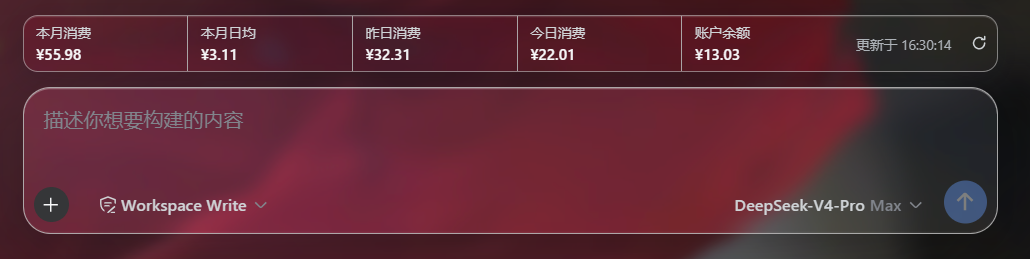
A plugin for the DeepSeek Harness (DSH) web GUI that monitors your DeepSeek API usage and balance in a billing strip pinned directly below the chat dialog (the conversation.input.dock slot, above the input box).
中文说明见下文。
Features
- Shows five figures in order: 本月消费 · 本月日均 · 昨日消费 · 今日消费 · 账户余额.
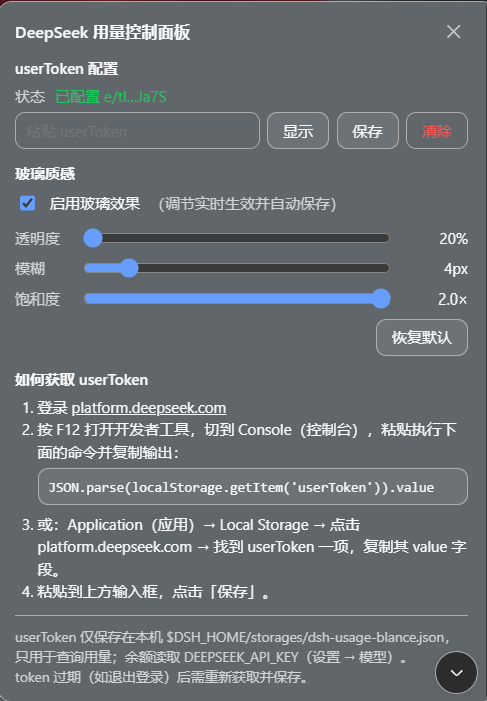
- Click any billing row to open the control panel: a
userTokeninput with save / clear, the current token status, and step-by-step instructions for finding the token. - Glass control panel: the billing strip is frosted glass (translucent + backdrop blur) by default; the control panel lets you toggle it and tune 透明度 (opacity) / 模糊 (blur) / 饱和度 (saturation) live — preferences persist in
localStorage. - Balance comes from the official public endpoint
GET https://api.deepseek.com/user/balance(authenticated withDEEPSEEK_API_KEY); usage comes from the platform dashboard endpointhttps://platform.deepseek.com/api/v0/usage/by_api_key/costwith Beijing-time (UTC+8) windows — the same source the platform page's 今天/昨天/本月 filters use (authenticated with the platformuserToken— the official API does not expose usage queries). - Auto-refreshes every 60 s plus a manual refresh button; per-row error states (missing key, missing/expired token, network failure) with hover hints.
- Follows the app's light/dark theme (
--dsw-*tokens). - Secrets never leave your machine: the browser only talks to local routes registered by the host half.
Screenshots
Billing strip below the chat dialog (本月消费 · 本月日均 · 昨日消费 · 今日消费 · 账户余额):
Control panel (opens when clicking any billing row): userToken input, save / clear, and the retrieval guide:
Install
Requires the DSH CLI and pnpm.
From GitHub
# clone and install from the checkout:
git clone https://github.com/zhou-yihang/dsh-usage-blance.git
cd dsh-usage-blance
dsh plugin --profile web add .
The package declares dsh.bundle, so dsh plugin automatically adds it to the profile's bundle layers (no manual patch editing). Then:
- Restart the web app:
dsh web(bundle layers are read at boot). - Open http://127.0.0.1:3080 and refresh the page.
- The billing strip appears below the chat dialog.
Manual alternative: install the package into the profile's
node_modulesand add a loader entry to~/.dsh/profiles/web/cordis.patch.yml:- insert: - id: dsh-usage-blance name: dsh-usage-blance
Configuration
userToken (usage figures)
The four usage figures need the platform session token. Click any billing row to open the control panel, then:
-
Sign in to platform.deepseek.com.
-
Press
F12to open DevTools → Console, paste and run:JSON.parse(localStorage.getItem('userToken')).valueCopy the printed string.
-
Or: Application → Local Storage → click
https://platform.deepseek.com→ find theuserTokenentry and copy itsvaluefield. -
Paste it into the control panel input and click 保存.
The token is validated immediately and saved to $DSH_HOME/storages/dsh-usage-blance.json (local machine only). When the token expires (e.g. after signing out), the usage rows show the error and you can renew it from the same panel.
DEEPSEEK_API_KEY (balance)
The plugin reads the same API key the harness already uses: DEEPSEEK_API_KEY, resolved from the launching environment or ~/.dsh/.credentials.yaml (set it on the Settings → Models page). No API key → the balance row shows the missing-key hint; the usage figures still work with a valid userToken.
How it works
| Part | File | What it does |
|---|---|---|
| Host half | lib/index.js | Cordis plugin (inject: webServer) registering GET /api/dsh-usage/overview (balance + month usage in one call) and GET/POST/DELETE /api/dsh-usage/token (token status / save+validate / clear). Balance and usage are cached for 60 s. |
| Browser half | lib/client.js | dsh.client web bundle registering the billing strip into the conversation.input.dock slot; polls the overview every 60 s; clicking a row opens the control panel. |
| Composition | cordis.patch.yml | The dsh.bundle patch layer that inserts the loader entry. |
| Tests | test/ | npm test runs the host parsing/state unit tests; node test/smoke.mjs boots the host half against mocked services and exercises the real route handlers; node test/client.repro.mjs renders the browser half under jsdom + react-dom and simulates a row click (panel opens, strip survives). |
Local routes
| Route | Purpose |
|---|---|
GET /api/dsh-usage/overview | { ok, at, tokenConfigured, balance, balanceError, usage, usageError } |
GET /api/dsh-usage/token | { ok, configured, masked } (the full token is never returned) |
POST /api/dsh-usage/token | Save ({ "token": "..." }) and validate; empty token clears |
DELETE /api/dsh-usage/token | Clear the saved token |
Data sources & privacy
- Balance:
GET https://api.deepseek.com/user/balance— official public API,Authorization: Bearer <DEEPSEEK_API_KEY>. - Usage:
GET https://platform.deepseek.com/api/v0/usage/by_api_key/cost?start=<sec>&end=<sec>&tz=<offset>— a private dashboard endpoint (may change without notice),Authorization: Bearer <userToken>. This is the same source the platform usage page's 今天/昨天/本月 filters aggregate. - Windows are anchored to Beijing time (UTC+8):
start/endare Beijing midnights in epoch seconds andtz=28800buckets the response by Beijing calendar days — the plain/usage/cost?month=&year=endpoint keys its day rows by UTC, which would shift each day's 00:00–08:00 usage into the previous row. - Month figures come from one month window (daily buckets): 本月消费 = sum of all buckets; 本月日均 = 本月消费 ÷ 本月已过天数; 昨日/今日 = their Beijing-day buckets (missing data counts as zero).
- Neither the API key nor the userToken ever reaches the browser beyond the local routes above; the API key is read host-side per request and the userToken is stored in plain text under
$DSH_HOME/storages/(protect that directory accordingly).
Development
git clone https://github.com/zhou-yihang/dsh-usage-blance.git
cd dsh-usage-blance
npm test        # 单元测试(node --test test/host.test.mjs)
node test/smoke.mjs        # 宿主侧 mock 全链路
node test/client.repro.mjs # 浏览器侧 jsdom 点击复现
# install locally and test in the web GUI:
dsh plugin --profile web add .
After changing lib/client.js, restart dsh web so the boot-graph hash (rev) regenerates, then hard-refresh the page.
License
MIT
中文说明
一个给 DeepSeek Harness(DSH)网页界面用的插件:在对话框正下方(conversation.input.dock 插槽,输入框上方)以账单条形式监控你的 DeepSeek API 用量与余额。
功能
- 依次显示五项指标:本月消费 · 本月日均 · 昨日消费 · 今日消费 · 账户余额。
- 点击任意账单行弹出控制面板:
userToken输入框(保存/清除)、当前配置状态,以及分步骤的 userToken 获取教程。 - 玻璃质感调节:账单条默认为毛玻璃(半透明 + 背景模糊);控制面板内可开关玻璃效果,并实时调节透明度 / 模糊 / 饱和度,偏好保存在
localStorage中。 - 余额来自官方公开接口
GET https://api.deepseek.com/user/balance(用DEEPSEEK_API_KEY认证);用量来自平台控制台接口https://platform.deepseek.com/api/v0/usage/by_api_key/cost,按北京时间(UTC+8)窗口查询——与平台用量页"今天/昨天/本月"同一数据源(用登录后拿到的平台userToken认证,官方 API 未开放用量查询)。 - 每 60 秒自动刷新,另有手动刷新按钮;每行都有独立错误态(未配置 Key、缺少/过期 token、网络失败),悬停可见原因。
- 自动跟随应用浅色/深色主题(
--dsw-*设计变量)。 - 密钥不出本机:浏览器只访问宿主侧注册的本地路由。
截图
对话框下方的账单条(本月消费 · 本月日均 · 昨日消费 · 今日消费 · 账户余额):
控制面板(点击任意账单行打开):userToken 输入、保存/清除与获取教程:
安装
需要 DSH CLI 与 pnpm。
从 GitHub 安装
git clone https://github.com/zhou-yihang/dsh-usage-blance.git
cd dsh-usage-blance
dsh plugin --profile web add .
该包声明了 dsh.bundle,dsh plugin 会自动把它加进 profile 的 bundle 层(无需手动改配置)。之后:
- 重启网页应用:
dsh web(bundle 层在启动时读取)。 - 打开 http://127.0.0.1:3080 并刷新页面。
- 对话框下方即出现账单条。
手动方式:把包放进 profile 的
node_modules,并在~/.dsh/profiles/web/cordis.patch.yml中加一条:- insert: - id: dsh-usage-blance name: dsh-usage-blance
配置
userToken(四项用量)
四项用量需要平台会话令牌。点击任意账单行打开控制面板,然后:
-
按
F12打开开发者工具 → Console(控制台),粘贴执行:JSON.parse(localStorage.getItem('userToken')).value复制输出的字符串。
-
或者:Application(应用) → Local Storage → 点击
https://platform.deepseek.com→ 找到userToken一项,复制其value字段。 -
粘贴到控制面板输入框,点击保存。
保存时会立即验证 token,并存储到本机 $DSH_HOME/storages/dsh-usage-blance.json。token 过期(如退出登录)后,用量行会显示错误,在同一面板重新获取即可。
DEEPSEEK_API_KEY(余额)
插件读取的正是 harness 自己在用的那个 Key:DEEPSEEK_API_KEY(从启动环境或 ~/.dsh/.credentials.yaml 解析;在设置 → 模型页面填写)。未配置时余额行显示提示,四项用量在 userToken 有效时仍可正常显示。
工作原理
| 部分 | 文件 | 作用 |
|---|---|---|
| 宿主侧 | lib/index.js | Cordis 插件(inject: webServer),注册 GET /api/dsh-usage/overview(一次返回余额+本月用量)与 GET/POST/DELETE /api/dsh-usage/token(状态 / 保存并验证 / 清除)。余额与用量各缓存 60 秒。 |
| 浏览器侧 | lib/client.js | dsh.client 网页包,把账单条注册进 conversation.input.dock 插槽;每 60 秒轮询;点击账单行弹出控制面板。 |
| 组合层 | cordis.patch.yml | dsh.bundle 补丁层,插入加载项。 |
| 测试 | test/ | npm test 跑宿主侧解析/状态单测;node test/smoke.mjs 用 mock 服务启动宿主侧并走通全部真实路由逻辑;node test/client.repro.mjs 在 jsdom + react-dom 中渲染浏览器侧并模拟点击(面板弹出、账单条不消失)。 |
本地路由
| 路由 | 用途 |
|---|---|
GET /api/dsh-usage/overview | { ok, at, tokenConfigured, balance, balanceError, usage, usageError } |
GET /api/dsh-usage/token | { ok, configured, masked }(绝不回传完整 token) |
POST /api/dsh-usage/token | 保存({ "token": "..." })并验证;空 token 视为清除 |
DELETE /api/dsh-usage/token | 清除已保存的 token |
数据来源与隐私
- 余额:
GET https://api.deepseek.com/user/balance——官方公开 API,Authorization: Bearer <DEEPSEEK_API_KEY>。 - 用量:
GET https://platform.deepseek.com/api/v0/usage/by_api_key/cost?start=<sec>&end=<sec>&tz=<offset>——平台私有接口(可能随时变更),Authorization: Bearer <userToken>。这正是平台用量页"今天/昨天/本月"筛选聚合的同一数据源。 - 时间窗口锚定北京时间(UTC+8):
start/end为北京时间零点(epoch 秒)、tz=28800按北京日历日分桶——旧的/usage/cost?month=&year=日行按 UTC 分桶,会把每天 00:00–08:00 的用量算进前一天。 - 月度指标由单次月窗口查询(按天 bucket)计算:本月消费 = 全部 bucket 之和;本月日均 = 本月消费 ÷ 本月已过天数;昨日/今日 = 对应北京日历日的 bucket(无数据记 0)。
- API Key 与 userToken 除上述本地路由外不会到达浏览器;API Key 由宿主侧每次请求时读取,userToken 以明文存于
$DSH_HOME/storages/(请自行保护好该目录)。
开发
git clone https://github.com/zhou-yihang/dsh-usage-blance.git
cd dsh-usage-blance
npm test        # 单元测试(node --test test/host.test.mjs)
node test/smoke.mjs        # 宿主侧 mock 全链路
node test/client.repro.mjs # 浏览器侧 jsdom 点击复现
# 本地安装并在网页界面中测试:
dsh plugin --profile web add .
修改 lib/client.js 后需重启 dsh web 以重新生成引导哈希(rev),再强制刷新页面。
协议
MIT
Project files and signals
Shown items are public repository signals detected in the directory snapshot.
Repository information
- Language
- JavaScript
- License
- MIT
- Last updated
- Aug 18, 2026, 8:34 AM
Install deliberately
Review source code, permissions, lifecycle hooks, dependencies and network access. Test untrusted plugins in an isolated environment.