Installation
npx -y @deepseek-ai/dsh plugin --profile web add github:Zzzzkd/dsh-prompt-railThis installation command is an unverified starting point generated from the GitHub repository address.
README
Maintainer-authored documentation snapshot.
DSH Prompt Rail
English | 中文
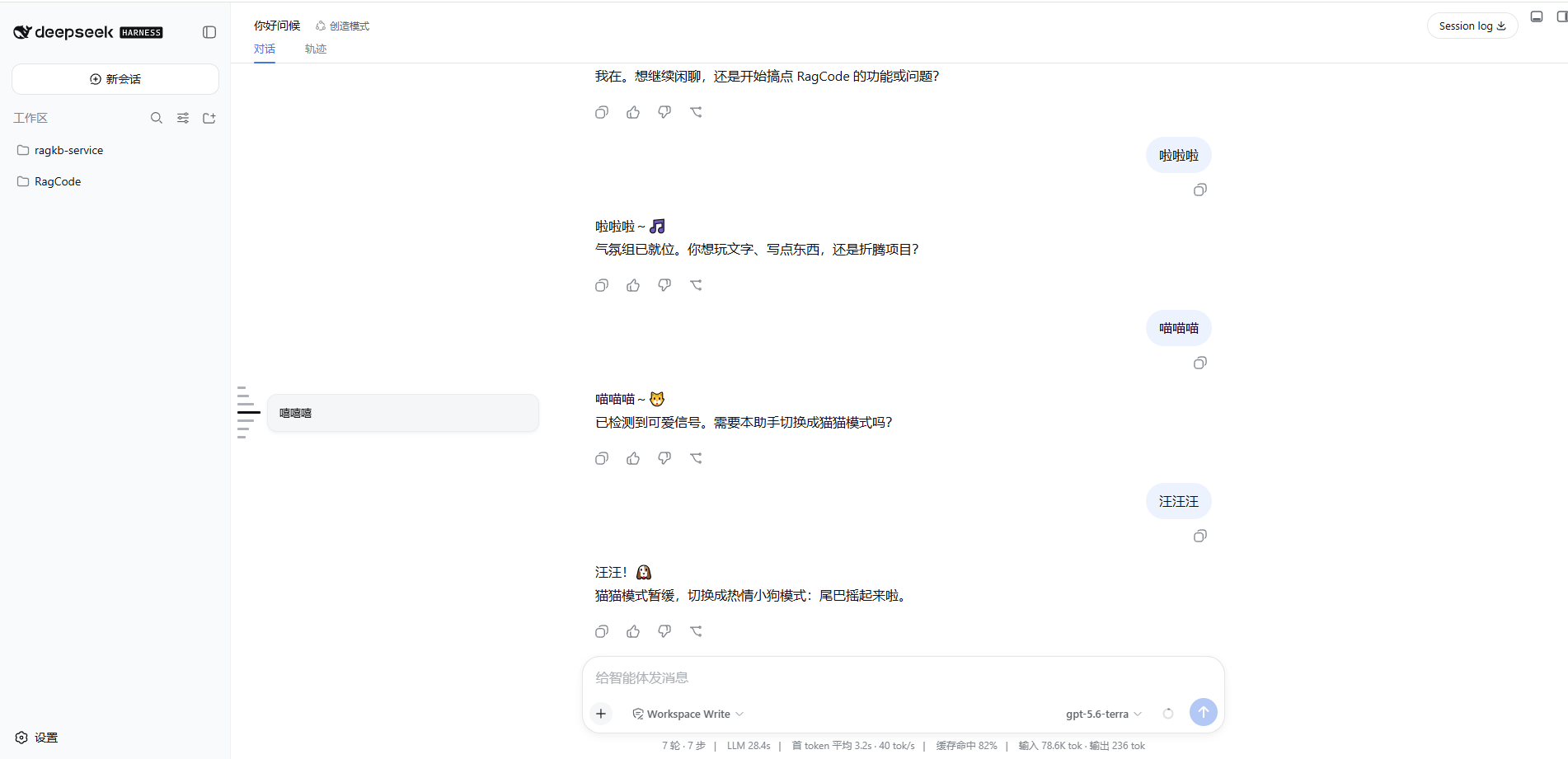
Prompt Rail is a compact vertical quick-jump rail for the DeepSeek Harness Web conversation view. One mark represents one loaded ordinary user prompt. Hover or keyboard focus shows its preview; clicking scrolls to that prompt.
Behavior
- The rail stays vertically centered beside the session sidebar.
- Every mark has a 10px high hit slot, while its default visible mark is an 8px by 3px light line.
- Hover/focus makes the current mark 28px wide and dark; nearby marks taper to 20px, 14px, and 10px.
- Clicking records the selected prompt. When the pointer leaves, all marks return to their default length while the selected mark stays dark.
- Assistant, tool, command, steering, and injected-context rows are excluded. A one-prompt conversation still renders one mark.
Install
Clone or copy this repository into the Harness root plugins directory:
deepseek-harness/
└─ plugins/
   └─ dsh-prompt-rail/
Then open a terminal in the deepseek-harness root and run:
Windows
.\plugins\dsh-prompt-rail\install-and-restart.bat
macOS / Linux
node ./plugins/dsh-prompt-rail/compat/install.mjs
pnpm dsh web
Keep the plugins/dsh-prompt-rail directory after installation.
Development
The development layout expects sibling checkouts:
workspace/
├─ dsh/                       # DeepSeek Harness checkout
└─ dsh-prompt-rail/
Then run:
pnpm install
pnpm run check
lib/ is committed because profile installation loads the prebuilt Host and browser files without running package build scripts.
Release checklist
- Add an exact compatibility patch for every supported pre-slot Harness revision.
- Run
pnpm run checkand exercisenode compat/install.mjs --apply-onlyin a clean matching checkout. - Commit source,
lib/,compat/, README files, screenshot, and lockfile. - Push a
v0.1.0tag and create a GitHub Release from that tag. - State the compatible Harness versions and revision hashes in the release notes.
License
MIT
Project files and signals
Shown items are public repository signals detected in the directory snapshot.
Repository information
- Language
- TypeScript
- License
- MIT
- Latest release
- v0.1.0
- Last updated
- Aug 15, 2026, 2:00 PM
Install deliberately
Review source code, permissions, lifecycle hooks, dependencies and network access. Test untrusted plugins in an isolated environment.