安装
npx @deepseek-ai/dsh plugin --profile web add "github:april-jk/dsh-mobile-plugin#v0.1.4"此命令根据 GitHub 仓库地址生成。运行前请检查上游 README 与源代码;需要可复现安装时,请固定 release 或 commit。
README
维护者编写的文档快照。
DSH Mobile Remote
Access a local DeepSeek Harness Web UI from a paired phone through an outbound-only Relay connection.
Community project: this is an unofficial project, independently developed and maintained by the community. It is not reviewed, endorsed, or supported by DeepSeek.
Complete project, signed Android APK, and private Relay package: DSH Mobile Suite
Compatibility
The current release is tested against @deepseek-ai/dsh@0.1.0-rc.6. DeepSeek Harness is in Developer Preview and may introduce breaking plugin changes. CI pins this version so compatibility changes are explicit.
Requirements:
- Node.js 18 or newer
- DeepSeek Harness
0.1.0-rc.6 - A phone running the companion DSH Mobile app
- HTTPS access to the configured Relay
Install
The immutable GitHub tag is the recommended public installation path. It requires neither a global DSH installation nor a local plugin directory:
npx @deepseek-ai/dsh plugin --profile web add "github:april-jk/dsh-mobile-plugin#v0.1.4"
npx @deepseek-ai/dsh web
Each GitHub Release also contains a prebuilt .tgz. DSH can install it directly from its release URL without a manual download or local path:
npx @deepseek-ai/dsh plugin --profile web add "https://github.com/april-jk/dsh-mobile-plugin/releases/download/v0.1.4/april-jk-dsh-mobile-0.1.4.tgz"
npx @deepseek-ai/dsh web
The package metadata is ready for npm, but @april-jk/dsh-mobile is not yet published to the public npm registry. After its first npm release, the registry command will be:
npx @deepseek-ai/dsh plugin --profile web add "@april-jk/dsh-mobile@<published-version>"
npx @deepseek-ai/dsh web
To uninstall:
npx @deepseek-ai/dsh plugin --profile web remove @april-jk/dsh-mobile
For local development, clone the repository and let the shell supply its current path:
git clone https://github.com/april-jk/dsh-mobile-plugin.git
cd dsh-mobile-plugin
npm ci
npm run build
npx @deepseek-ai/dsh plugin --profile web add "$PWD"
npx @deepseek-ai/dsh web
Pair a phone
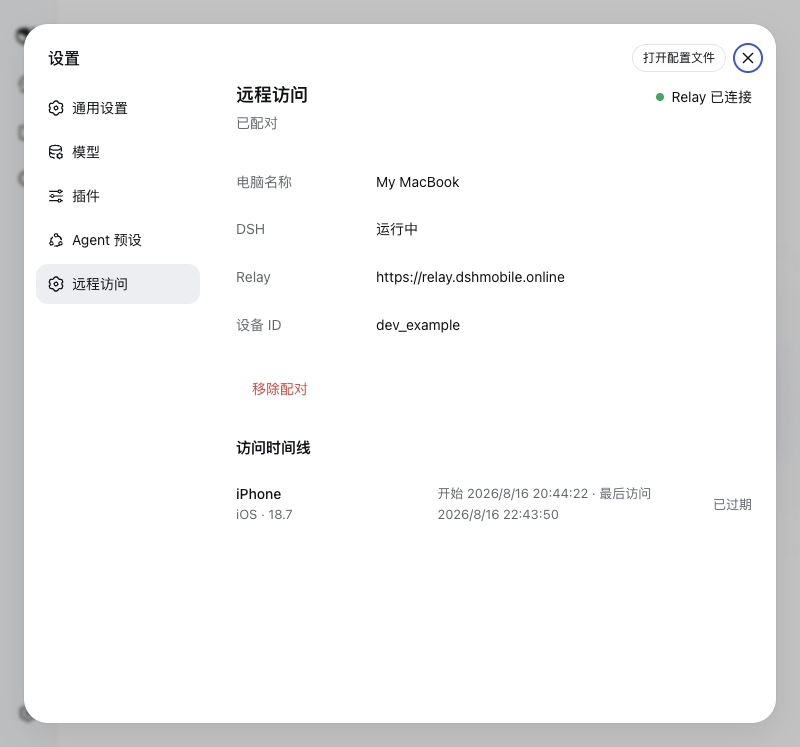
Open Settings > Remote Access in the local DSH Web UI and scan the version 2 QR code with the mobile app. The QR code transfers the one-time pairing data and the end-to-end encryption key; a six-digit code by itself is not sufficient in version 0.1.4. Later DSH starts reuse the device credential stored in ~/.dsh-remote/config.json with owner-only permissions.
The same settings page can remove the pairing. Removal revokes the Relay device credential, disconnects active remote access, and clears the local credential only after the Relay confirms the operation. The dsh-mobile unpair command provides the same behavior when the Web UI is unavailable.
Network and data behavior
- DSH remains bound to
127.0.0.1:3080; the plugin never creates a public listener. - The computer opens an outbound WSS connection to
https://relay.dshmobile.onlineby default. SetDSH_RELAYbefore starting DSH to use another compatible Relay. - HTTP, SSE, and WebSocket payloads are end-to-end encrypted between the mobile app and this Companion with AES-256-GCM. The Relay only forwards sealed frames; TLS additionally protects connection metadata in transit.
- Version 0.1.4 uses a QR-provisioned pre-shared key and does not provide forward secrecy. Unpair a device and pair it again if the QR code or either endpoint may have been compromised.
- The plugin stores its Relay device token locally in
~/.dsh-remote/config.jsonand never sends that token to the mobile client. - The Relay records bounded phone metadata and access times for the access timeline. It does not persist DSH request or response bodies.
- Installing this bundle disables DSH's native directory picker and enables the browser-based picker so remote browsers can choose a directory without opening Finder or another native dialog.
For a private Relay, start DSH with the same HTTPS origin configured in the mobile app:
DSH_RELAY=https://relay.example.com npx @deepseek-ai/dsh web
Standalone commands
The fallback CLI is installed as dsh-mobile and supports start, pair, status, and unpair. Normal users should manage pairing through the DSH settings page.
Development
npm ci
npm run build
npm test
npm pack --dry-run
dist/ is committed intentionally so GitHub installs have a complete plugin without lifecycle scripts. CI runs build, tests, bundle freshness checks, and an npm pack check on Node.js 18, 20, and 22. It also verifies installation against the pinned DSH Developer Preview.
To publish a release, update package.json and package-lock.json, rebuild dist/, and push a tag that exactly matches v<package.version>. The tag workflow repeats all release checks, then creates an immutable GitHub Release with the prebuilt npm tarball and SHA256SUMS. A rerun succeeds only when the existing asset set and both asset contents are identical; it never overwrites an existing asset. A mismatched tag fails before any artifact is uploaded.
npm publishing is disabled by default. Repository maintainers can opt in by setting the Actions variable NPM_PUBLISH_ENABLED to true and adding an NPM_TOKEN Actions secret with publish access to @april-jk/dsh-mobile. With either setting absent, GitHub Releases continue normally and no npm publish is attempted.
Community discovery
The repository should use the dsh-plugin and deepseek-harness GitHub topics. A single-project post for the official plugin Discussion category can use:
DSH | DSH Mobile Remote | Access your local DSH Web UI from a paired phone
A ready-to-post project description is maintained in docs/SHOW-YOUR-PLUGIN.md.
License
项目文件与信号
以下项目是目录快照中检测到的公开仓库信号。
仓库信息
- 开发语言
- TypeScript
- 许可证
- MIT
- 最新发布
- v0.1.4
- 最后更新
- 2026年8月17日 05:34
谨慎安装
请检查源代码、权限、生命周期脚本、依赖与网络访问;不受信任的插件应先在隔离环境中测试。