Installation
npx -y @deepseek-ai/dsh plugin --profile web add github:Andyqwe44/dsh-notify-winThis installation command is an unverified starting point generated from the GitHub repository address.
README
Maintainer-authored documentation snapshot.
dsh-notify-win
DeepSeek Harness (DSH) Windows notification plugin — native toast + taskbar flash when a task finishes or your input is needed.
English | 中文



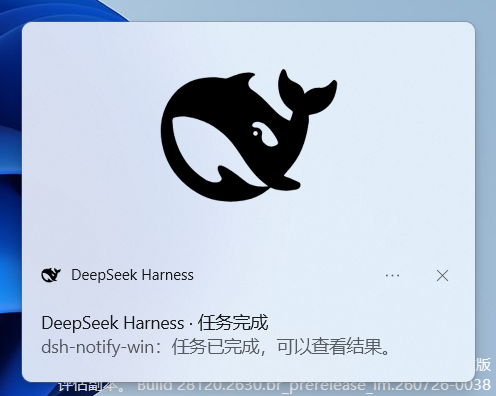
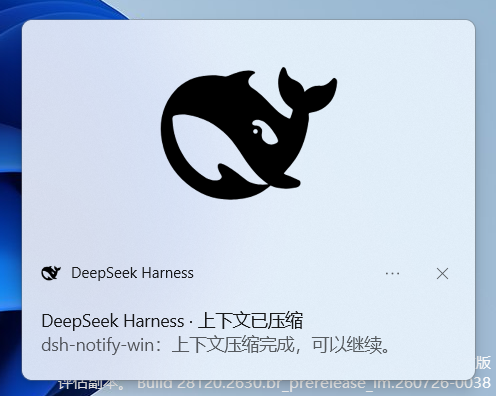
📸 Screenshots
Task finished
Context compacted
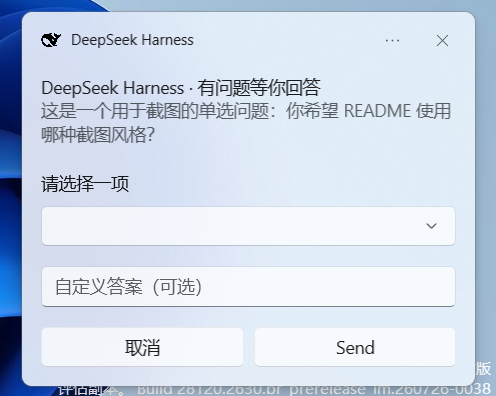
Question — single select
Toast timeout → taskbar flash

Screenshots are from Windows 11. The taskbar flash is animated; the screenshot shows the DSH taskbar button highlighted by the system warm pulse.
✨ Features
- 🔔 Native Windows toast (bottom-right, Win10/11 system style)
- 💡 Taskbar flash (
FlashWindowEx) when DSH is in the background - 🖱️ Click-to-focus — clicking a toast opens DSH and switches to the corresponding session
- ✅ Triggers when a task finishes (root agent goes
idle) - 🗜️ Triggers when context compaction finishes (
session/event→compaction/end) - ❓ Triggers when your input is needed (approval /
ask_user_question) - 📋 Single-select question toast: native dropdown with up to 5 options + “自定义答案” (custom answer) text input + Cancel / Send
- ⏰ Timeout flash fallback: if an interactive toast is ignored and dismissed by the system timeout, the taskbar flashes so the pending question is not missed
- 🖼️ Hero banner with the DeepSeek Harness logo (light/dark theme aware)
- 🚀 Fire-and-forget: no service, no model approval, no settings namespace
🚀 One-line install
dsh plugin --profile web add dsh-notify-win
Requires
pnpmon PATH (corepack enableif missing). See Install for details.
Install
-
Prerequisite: pnpm
corepack enableOr without admin, put a user-level shim in a PATH directory:
Set-Content -Path "$env:LOCALAPPDATA\Microsoft\WindowsApps\pnpm.cmd" -Value "@echo off`r`ncorepack pnpm %*`r`n" corepack pnpm --version -
Install the plugin
# From npm (recommended) dsh plugin --profile web add dsh-notify-win # Or directly from GitHub: dsh plugin --profile web add github:Andyqwe44/dsh-notify-win # If github: is blocked, use SSH: dsh plugin --profile web add git+ssh://git@github.com/Andyqwe44/dsh-notify-win.git -
Verify
dsh --profile web --dump-config # look for: # == dsh-notify-win / - id: dsh-notify-win -
Restart and test
dsh webComplete any task. The first notification self-registers the branded toast identity (Start Menu shortcut + AppUserModelID, one-time). If the toast header still shows
DeepSeekHarnesswithout an icon, restart Explorer once:Stop-Process -Name explorer -Force; Start-Process explorer
Requirements
- Windows 10/11
- DeepSeek Harness, any profile (
webrecommended) - PowerShell 7 or Windows PowerShell 5.1 (5.1 is used automatically as fallback)
- .NET 10 Desktop Runtime (x64) — only needed for interactive question toasts (
ask_user_question); done/compact toasts use PowerShell and do not require it
Configuration
Edit $env:USERPROFILE\.dsh\profiles\web\cordis.patch.yml:
- id: dsh-notify-win
  config:
    doneTitle: 'DeepSeek Harness · Task complete'
    doneBody: 'Your task has finished.'
    compactTitle: 'DeepSeek Harness · Context compacted'
    compactBody: 'Context compaction finished, you can continue.'
    questionTitle: 'DeepSeek Harness · Action needed'
    questionBody: 'An approval or decision is waiting.'
    askTitle: 'DeepSeek Harness · Question for you'
    askBody: 'The assistant asked you something.'
    dedupMs: 1500              # suppress duplicate notifications within this window
    showProject: true          # prefix body with project label
To disable:
- id: dsh-notify-win
  disabled: true
Restart after install/disable changes (web profile HMR is disabled by default).
How it works
| Concern | Implementation |
|---|---|
| Trigger "done" | agent/status event with status: 'idle' (root agents only) |
| Trigger "compact" | session/event → compaction/end (no error) |
| Trigger "question" | approval/request waterfall + tools/execute for ask_user_question |
| Done/compact toast | WinRT Windows.UI.Notifications via notify.ps1 with hero banner, falls back to NotifyIcon balloon |
| Interactive question toast | .NET helper dsh-toast-question.exe (reads dropdown/text input and posts the answer back to the host) |
| Taskbar flash | EnumWindows + FlashWindowEx (FLASHW_TRAY | FLASHW_TIMERNOFG = 14) |
| Execution | Fire-and-forget subprocess (powershell / dsh-toast-question.exe) |
The plugin registers no service, tool, or settings namespace — a plain consumer row, safe in any profile.
Known limitations
- Native toast text is compact: only about 4 lines are displayed, so long content is truncated.
- The native selection dropdown may collapse when the pointer moves onto the popup; if the toast is then dismissed by timeout, the taskbar flash still reminds you.
FlashWindowExuses the system's warm-pulse highlight; custom colors are not possible.- Windows never flashes the foreground window — the taskbar button only flashes when DSH is in the background.
- Cancelling a running turn also goes
idle, so a cancelled task still triggers the "done" toast. - Notifications are deduplicated per session within
dedupMs(default 1500 ms). - Interactive question toasts require the .NET 10 Desktop Runtime on the machine.
Development
npm run check     # syntax check
npm test          # logic smoke test (mocked ctx)

# Show a real toast + taskbar flash:
powershell -NoProfile -File lib/notify.ps1 -Kind done -Title "test" -Body "test"

# Rebuild the interactive question helper:
dotnet publish src/DshToastQuestion/DshToastQuestion.csproj -c Release -r win-x64 --self-contained false -p:PublishSingleFile=true -o lib
Project layout
dsh-notify-win/
├── lib/
│   ├── index.js               # Host half: event listeners -> subprocess spawn
│   ├── client.js              # Browser-side click-to-focus / answer polling
│   ├── notify.ps1             # Done/compact toast + taskbar flash
│   ├── focus-dsh.ps1          # Focus/launch the DSH Edge PWA
│   ├── focus-dsh.vbs          # Hidden launcher for focus-dsh.ps1
│   ├── dsh-toast-question.exe # Interactive question toast helper (C#)
│   └── dsh-*.png / dsh-*.ico  # Branding assets
├── src/DshToastQuestion/
│   ├── Program.cs             # C# helper source
│   └── DshToastQuestion.csproj
├── test/
│   ├── smoke.mjs              # Plugin logic smoke test
│   └── headless-overlay.yml
├── docs/
│   └── assets/screenshots/    # README screenshots
├── cordis.patch.yml           # DSH bundle patch
├── package.json               # dsh.bundle declaration
├── README.md
└── README.zh.md
Links
- 🌐 Landing page: https://Andyqwe44.github.io/dsh-notify-win/
Roadmap
- V1 (implemented): done + compact + question toasts; single-select dropdown with custom answer; Cancel / Send; timeout → taskbar flash fallback.
- V1.1 (experimental / not stable yet): multi-select question toast by numbered input.
- V2 (planned): fully self-contained packaging (no .NET runtime install) and/or background activation so toast buttons submit without any foreground activation.
License
Project files and signals
Shown items are public repository signals detected in the directory snapshot.
Repository information
- Language
- JavaScript
- License
- MIT
- Last updated
- Aug 16, 2026, 3:17 PM
Install deliberately
Review source code, permissions, lifecycle hooks, dependencies and network access. Test untrusted plugins in an isolated environment.