Installation
npx -y @deepseek-ai/dsh plugin --profile web add github:ankesu/dsh-emoji-walletThis installation command is an unverified starting point generated from the GitHub repository address.
README
Maintainer-authored documentation snapshot.
dsh-emoji-wallet



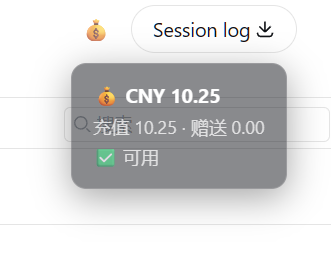
A minimal DeepSeek balance wallet for DeepSeek Harness: one click shows your API balance right in the session header.
DSH 余额小钱包:顶栏一个 💰,点一下就知道 DeepSeek API 还剩多少钱。
Features / 功能
- 💰 One-click balance — a small wallet button in the session header (right side, next to Session log)
- 🔒 Key never leaves the host — the browser only ever sees the balance numbers; the API key is read from the harness credentials file (
~/.dsh/.credentials.yaml) on the host - 🫧 Semi-transparent bubble — click to open, click again to close (auto-closes after 8s)
- 🎛️ No config needed — reads
DEEPSEEK_API_KEYautomatically
Install / 安装
dsh plugin --profile web add dsh-emoji-wallet
Restart the harness. A 💰 button appears in the session header, right next to Session log. Click it to see your balance.
How it works / 原理
- Host half:
GET /api/wallet/balancereadsDEEPSEEK_API_KEYfrom~/.dsh/.credentials.yamland querieshttps://api.deepseek.com/user/balance - Client half: a slot component in
conversation.session.header.utilities(the same container as Session log), positioned before it with flexorder: -1
License
MIT
Project files and signals
Shown items are public repository signals detected in the directory snapshot.
DocumentationDetected
Repository information
- Language
- TypeScript
- License
- MIT
- Last updated
- Aug 17, 2026, 8:32 AM
Install deliberately
Review source code, permissions, lifecycle hooks, dependencies and network access. Test untrusted plugins in an isolated environment.