Installation
npx -y @deepseek-ai/dsh plugin --profile web add github:glenngit/dsh-topThis installation command is an unverified starting point generated from the GitHub repository address.
README
Maintainer-authored documentation snapshot.
dsh-top
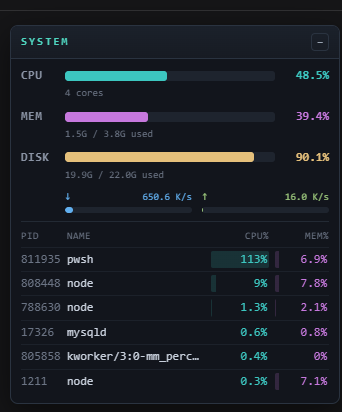
A plugin for the DeepSeek Harness (DSH) web GUI: a system monitoring tool that shows live system stats in a floating, collapsible panel pinned to the top-right corner.

Features
- CPU — live utilisation (computed from
/proc/statdeltas) + core count - MEM — used / total with percentage bar
- DISK — used / total with percentage bar
- NETWORK — download / upload throughput (computed from
/proc/net/devbyte deltas) - Top 6 processes — PID, name, CPU%, MEM%
- Dark color-coded palette (cyan CPU, magenta RAM, yellow disk, blue/green network), monospace
- Draggable via the title bar, collapsible via the
–/+button - Transient monitor processes (
ps,awk,head, …) are filtered out of the top-processes list
How it works
| Part | File | What it does |
|---|---|---|
| Host half | lib/index.js | Registers GET /api/dsh-top-stats; reads CPU, memory, disk, network and top processes with read-only /proc + ps + df reads. |
| Browser half | lib/client.js | dsh.client web bundle; registers the panel into the frame-wide shell.overlay slot; polls every 2 s. |
| Composition | cordis.patch.yml | The dsh.bundle patch layer that inserts the loader entry. |
Security
Because it is a system monitor, the host half reads host-wide process, CPU, memory and disk state. To do that it invokes the fixed read-only binaries cat, ps and df via execFileSync with a static argv array (never a shell string), so there is no shell-injection surface and no attacker-controlled input. No data leaves the host, no credentials are read, and every read is read-only.
dsh.so's static scanner flags thenode:child_processimport as "critical". That is a heuristic signal on the mere presence of process access — not a vulnerability. Process access is intrinsic to a monitoring tool; review the (small) source yourself: the commands are hard-coded, read-only, and argument-confined.
Install
# place this package somewhere, then link it into your web profile:
dsh plugin --profile web add .
# or wire it manually into the profile's bundles + link dependency
Then restart the web app and refresh the page — the panel appears at the top-right.
License
Project files and signals
Shown items are public repository signals detected in the directory snapshot.
Repository information
- Language
- JavaScript
- License
- MIT
- Last updated
- Aug 17, 2026, 8:33 AM
Install deliberately
Review source code, permissions, lifecycle hooks, dependencies and network access. Test untrusted plugins in an isolated environment.