Installation
npx -y @deepseek-ai/dsh plugin --profile web add github:Iwctwbh/dsh-dynamic-toolboxThis installation command is an unverified starting point generated from the GitHub repository address.
README
Maintainer-authored documentation snapshot.
dsh-dynamic-toolbox
A session toolbox for DeepSeek Harness: 1 framework + 28 tool plugins as dynamic Cordis plugins · MIT License
v2026.08.17 — 流程图升级:并行组虚线框、混合步骤统一归并(子代理分支不再落单)、消息卡详情浮层/模型 tag/进行中流光、连接符「先线后箭头」;抽屉:默认「流程」Tab、「回到最新」修复、正常方向面板默认贴底。
中文文档见下方 中文 section。
Every plugin is mounted through a disk-loading stub: the payload is a ~0.9KB stub, the implementation lives on disk, so code edits take effect by simply re-running the plugin — no re-define, no re-approval.
Features
- Framework plugin (tbx): Host-side tool registry + RPC, Client-side drawer / tab bar / shared HTML panel shell (tb- design system)
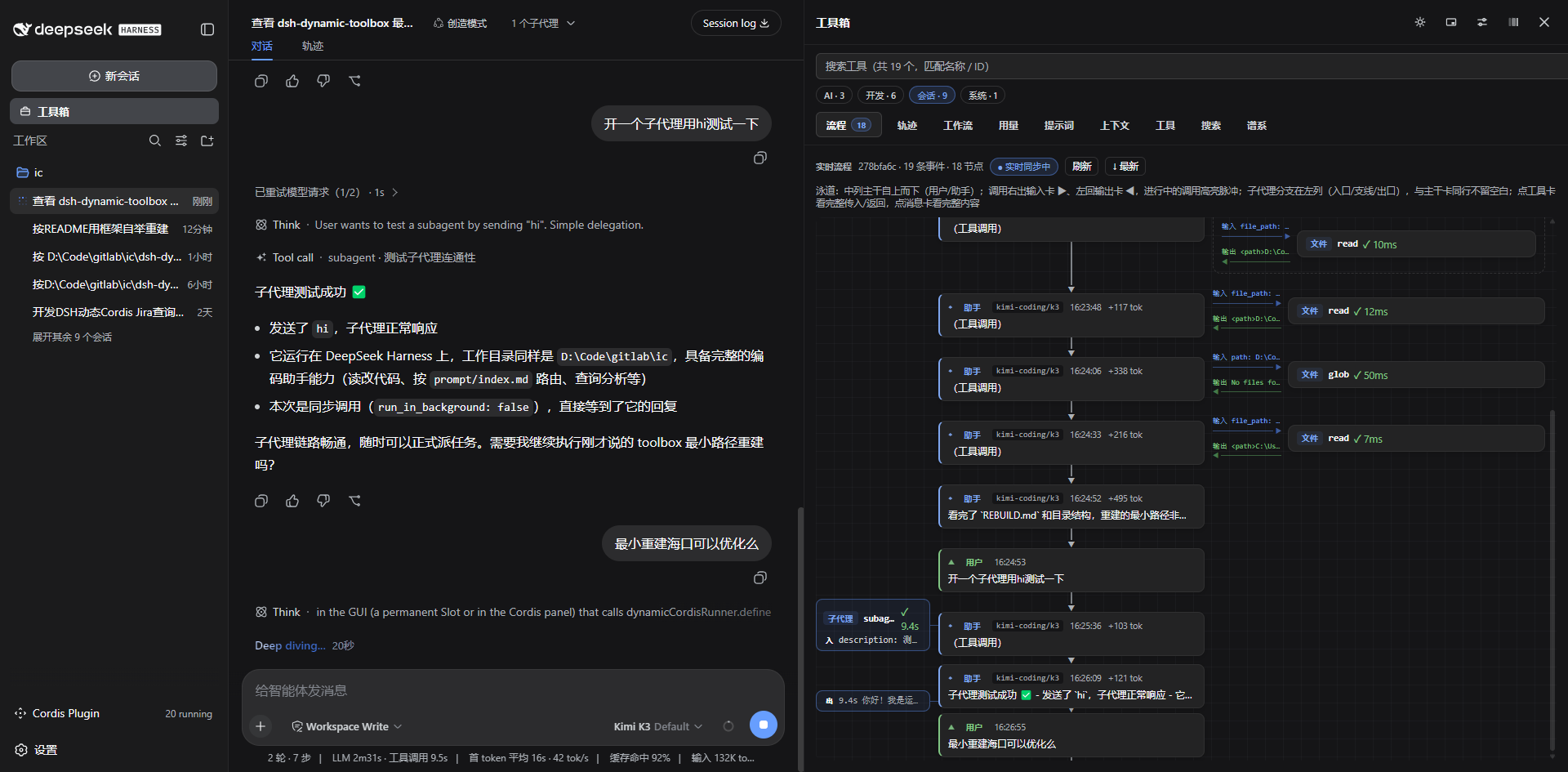
- Live flow (流程): the drawer's default tab — renders the current session as a real-time flowgraph with subagent branches and parallel-call groups (see spotlight below)
- Project tools: Jira (query/archive), Git (history/diff), workspace file tree
- Utilities: trace, HTTP client, ports, regex tester, codec, text diff, cron explainer, generator
- Session insight: token usage, system-prompt assembly, context window, tool list, full-text search, lineage tree, multi-model compare
- AI tools: ask, translate, prompt optimizer, commit message, code review, session summary, usage ledger — all routed through a shared
makeLlmHelper - Self-inspection: selfview (screenshot / semantic snapshot / ui_* model tools)
- Bootstrap rebuild: the framework auto-defines and starts all missing plugins from
plugins.jsonon startup (idempotent, ~0.4s for all 28), honoring per-plugin enable memory - Contract smoke tests:
node smoke.mjsruns 13 simulation suites against real plugin impls with mocked ctx/services
Spotlight: Live Flow (流程)
The drawer's default tab turns the current session into a living flowgraph, silently auto-refreshing every 2s (pausable via the live toggle):
- Three-lane layout — the center trunk walks user/assistant steps top-down; each tool call branches right with its input card ▶ and returns left with its output card ◀ (green on success, red on error, dashed while in flight)
- Subagent branches — a spawned child session grows its own left-column branch (entry / steps / exit) on the same row as the trunk card that started it, with steps sampled from the child's own session log
- Parallel groups — simultaneous tool calls in one step are wrapped in a dashed 「并行 ×N」 frame; the running call pulses with a highlight so you always see exactly which step the agent is on
- Zero-jump details — click a tool card for its full arguments/result, click a message card for full content with model + token metadata; details open in a side overlay instead of inflating the flow, so expand/collapse never moves your scroll position
Quick start (as a user)
Prerequisites: DeepSeek Harness running with dynamic-plugin (Cordis) support; a workspace directory. First-time bootstrap requires 「创造模式」(Creative mode / cordis preset) — only that preset mounts the cordis_define / cordis_run model tools; other modes (标准/PTC/极简) don't have them, so the initial define+run of the framework must start there. Once the framework is running, daily rebuild/rerun/toggle works in any mode — the drawer manage view and the Cordis panel drive the process-global runner directly (no model tools involved).
1. Clone this repo and open the repo root as your DSH workspace (repo root = workspace root)
2. Switch the session to 「创造模式」(Creative mode) via the mode selector at the top of the GUI (required for the first bootstrap only)
3. In a DSH session: cordis_define ← plugins/toolbox/payload.json
4. cordis_run and approve once in the GUI
5. The framework auto-bootstraps the remaining 28 plugins (selfview asks for one more approval)
Credentials (e.g. Jira) live in the Harness credential store or environment variables — never in this repo. Full guide: REBUILD.md, plugin authoring: PLUGIN-DEV.md.
Where a rebuild is recorded
No handwritten log — every bootstrap run leaves its trail in four places:
| Where | What |
|---|---|
.dsh-dynamic-toolbox/toolbox-autorebuild.json | Framework-written report of the latest doRebuild: defined / started / skipped / suppressed / failed / approvalPending + elapsed ms, with a cumulative history array |
| Session chat / Run cards | The cordis_define → cordis_run → approval flow, one Run card per plugin |
| Cordis runtime (in-process) | pluginId / packageId / currentPackageId version pointers, queryable anytime via cordis_inspect_self |
.dsh-dynamic-toolbox/toolbox-plugins.json | Enable memory — only read by a rebuild; rewritten only when you toggle a plugin in the drawer |
The whole .dsh-dynamic-toolbox/ directory is git-ignored runtime state.
License
MIT © 2026 Iwctwbh
中文文档
DSH 工具箱(动态 Cordis 插件集)· MIT License
运行在 DeepSeek Harness 上的会话级工具箱:1 个框架插件 + 28 个工具插件, 全部以「磁盘加载桩」方式挂载——payload 是 ~0.9KB 的桩,实现全在磁盘,改代码重跑即生效。
使用(把本仓库装进你的 DSH)
前置:已安装并运行 DeepSeek Harness(支持动态 Cordis 插件);有一个工作区目录。首次自举重建须处于「创造模式」(cordis preset)——只有它挂载 cordis_define / cordis_run 模型工具,框架的首次 define+run 只能在那里发起;标准/PTC/极简模式没有这些工具。框架跑起来之后,日常的补齐/重跑/启停在任何模式都能进行——抽屉管理视图与 Cordis 面板直驱进程级全局 runner,不经过模型工具。
1. 将本仓库 clone 下来,并把仓库根目录作为 DSH 工作区打开(仓库根 = 工作区根)
2. 在 GUI 顶部把会话切换到「创造模式」(仅首次自举需要)
3. 在 DSH 会话中:cordis_define  ←  plugins/toolbox/payload.json
4. cordis_run,并在 GUI 批准一次
5. 框架启动自动补齐其余 28 个插件(幂等,全量 ≈ 0.4s;selfview 会再弹一次批准)
- 启动集合遵循启停记忆
<工作区>/.dsh-dynamic-toolbox/toolbox-plugins.json - 主题插件(青绿/暖橙)只 define 不启动,互斥按需激活
- 凭据(Jira 等)走 Harness 凭据存储或环境变量,不写入本仓库任何文件
- 无框架时的手动路径与完整细节见
REBUILD.md
重建操作记录在哪
重建不手写日志——每次自举在四个位置留下轨迹:
| 位置 | 内容 |
|---|---|
.dsh-dynamic-toolbox/toolbox-autorebuild.json | 框架 doRebuild 自动写入的最新报告:defined / started / skipped / suppressed / failed / approvalPending + 耗时,附 history 累积数组 |
| 会话聊天 / Run 卡 | cordis_define → cordis_run → 批准 的操作流,每个插件一张 Run 卡 |
| Cordis 运行时(进程内) | pluginId / packageId / currentPackageId 版本指针,随时 cordis_inspect_self 可查 |
.dsh-dynamic-toolbox/toolbox-plugins.json | 启停记忆——重建只读取它;只有在抽屉里手动启停插件时才会被改写 |
整个 .dsh-dynamic-toolbox/ 目录都在 .gitignore 里(见下方「数据与隐私约定」)。
目录结构
(仓库根 = 工作区根)
  plugins.json          重建总清单(决策元数据)
  make-payloads.mjs     单一事实源:PLUGINS 表 → 生成全部 payload + 语法检查
  smoke.mjs             契约冒烟入口(node smoke.mjs 全量回归)
  loader.js             磁盘级加载器(桩的固定入口)
  shared/host.js        共享辅助(注册重试/持久化/AI 助手 makeLlmHelper 等)
  plugins/<key>/        文件夹即插件:plugin.json + payload.json + impl
  REBUILD.md            重建/迭代/数据结构完整指南
  PLUGIN-DEV.md         新插件编写指南与面板契约
  插件.md               动态插件开发踩坑实录
插件清单(29)
| 分组 | 插件 |
|---|---|
| 框架 | toolbox(Host 注册表 + Client 抽屉/Tab/面板壳) |
| 项目工具 | jira(查询/归档)、git(历史/diff)、files(文件树) |
| 主题 | theme-teal / theme-amber(互斥,按需激活) |
| 实用工具 | trace、http、ports、regex、codec、txtdiff、cron、gen |
| 会话洞察 | flow(实时流程图)、usage、prompt、context、tools、search、lineage、compare |
| AI 工具 | ask、translate、promptopt、commitmsg、review、aisummary、aiusage(台账) |
| 界面自查 | selfview(截屏/语义快照/ui_* 模型工具) |
亮点:实时流程(流程 Tab)
抽屉默认 Tab,把当前会话实时画成流程图,每 2s 静默自刷(live 开关可暂停):
- 三列泳道:中列主干自上而下走「用户/助手」步骤;工具调用右出输入卡 ▶、左回输出卡 ◀(成功绿色、错误红色、进行中虚线)
- 子代理分支:子会话在左列长出独立支线(入口/支线/出口),与触发它的主干卡同行不留空白,支线步骤取自子会话自己的日志
- 并行分组:同一步的多个并行调用用虚线框 +「并行 ×N」角标圈成一组;进行中的调用高亮脉冲,一眼看到智能体正跑到哪一步
- 零跳跃详情:点工具卡看完整传入/返回,点消息卡看完整内容(含模型/tokens 元信息);详情挂右侧浮层、不撑高流程内容,展开收起滚动位置不动
日常迭代
改 plugins/<key>/tool.js(或 framework、shared、loader)
  → 抽屉齿轮「重跑」该行即生效(不用重新 define/批准)
  → 批量改完点「全部重跑」
插件增减/改 inject → 编辑 make-payloads.mjs 的 PLUGINS 表
  → node make-payloads.mjs 重新生成 + 语法检查
改 shared/framework/面板协议 → 必跑 node smoke.mjs
数据与隐私约定
以下内容不入库(见 .gitignore):
| 路径 | 内容 |
|---|---|
.dsh-dynamic-toolbox/ | 运行状态与历史:Jira 查询记录、AI 台账、启停记忆、自动补齐报告 |
.dsh-dynamic-toolbox/data/ | 内容产物:Jira 工单归档(issue.md/json + 附件) |
.scratch/ | 开发草稿/一次性脚本 |
文档索引
REBUILD.md— 目录结构、重建、迭代、数据与凭据PLUGIN-DEV.md— 新插件三步、impl 骨架、面板契约插件.md— 心智模型与真实坑清单
License
MIT © 2026 Iwctwbh
Project files and signals
Shown items are public repository signals detected in the directory snapshot.
Repository information
- Language
- JavaScript
- License
- MIT
- Latest release
- v2026.08.17
- Last updated
- Aug 17, 2026, 9:01 AM
Install deliberately
Review source code, permissions, lifecycle hooks, dependencies and network access. Test untrusted plugins in an isolated environment.