Installation
npx -y @deepseek-ai/dsh plugin --profile web add github:rvaim/dsh-compatThis installation command is an unverified starting point generated from the GitHub repository address.
README
Maintainer-authored documentation snapshot.
@rvaim/dsh-compat


DeepSeek Harness(DSH)的 Claude Code / Codex 旧插件兼容层。它把一个旧插件作为完整生命周期单元接入 DSH,让 Skill、MCP 与 Hook 尽量保持原目录和原语义运行。
当前版本:
0.4.4。目标 DSH:0.1.0-rc.6。Plugin parser:2.0.1,Source parser:2.0.0。
安装
要求 Node.js ^22.19.0 或 >=24.0.0;使用 Git 来源时还需要 Git。
从 npm:@rvaim/dsh-compat 安装到目标 profile:
dsh plugin --profile web add @rvaim/dsh-compat@latest
把 web 换成实际 profile 名称即可。首次安装或升级 @rvaim/dsh-compat 后,需要重启该 profile 并重新加载 Web 页面,因为 DSH 的 Host/Client 插件图发生了变化。
如果 profile 之前通过 GitHub 安装过未加 scope 的 dsh-compat,先移除旧依赖再安装 npm 组织包:
dsh plugin --profile web remove dsh-compat
dsh plugin --profile web add @rvaim/dsh-compat@latest
这只替换 DSH bundle 依赖,不会删除 $DSH_HOME/dsh-compat/ 中已安装旧插件的数据。
使用
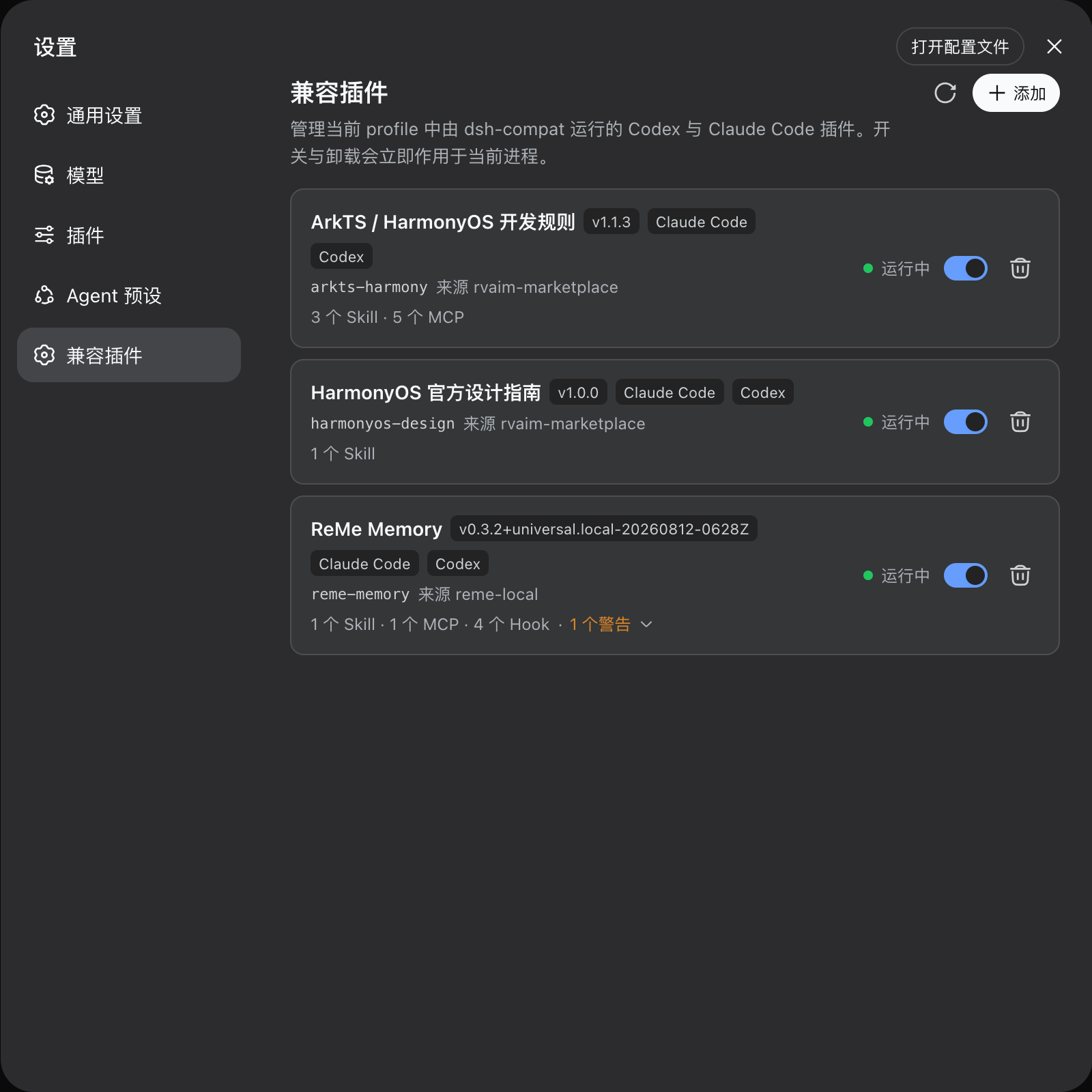
- 启动 profile,在 DSH Web 中打开“设置 → 兼容插件”。
- 点击“添加”,输入 Git URL、
github:owner/repo#ref、本地目录或 ZIP/TAR/TGZ 归档。 - 单插件来源会直接安装;多插件来源会显示复选列表,确认后从同一份固定快照安装所选插件,不会再次拉取。
- 使用开关在线启用或停用整个插件;使用删除按钮卸载。错误或警告数量可以展开查看说明、诊断代码、能力类型与关联文件。
- 点击刷新会检查每个已安装插件所属 Source 的最新 revision;有更新时插件行会显示“更新”按钮,点击后在当前进程中更新并重启该插件。
旧插件的添加、启用、停用和卸载会立即作用于当前 DSH 进程,通常无需重启。只有安装、升级或删除 @rvaim/dsh-compat 本体时需要重启 profile。
本包不提供独立 CLI。常用操作在 Web 设置页完成;批量与自动化场景使用 ctx.compat 服务 API。
服务 API
其他 DSH 插件可以声明:
export const inject = ['compat']
然后调用:
ctx.compat.sourceAdd(source, options?)
ctx.compat.sourceRemove(sourceId)
ctx.compat.sourceUpdate(sourceId, options?)
ctx.compat.sourceList()
ctx.compat.sourceInspect(sourceId)

ctx.compat.prepareInstall(source, options?)
ctx.compat.install(sourceOrSourceId, options?)
ctx.compat.checkUpdates()
ctx.compat.update(pluginId, options?)
ctx.compat.enable(pluginId)
ctx.compat.disable(pluginId)
ctx.compat.uninstall(pluginId)
ctx.compat.list()
ctx.compat.inspect(pluginId)
服务 API 直接通知运行管理器,适合对正在运行的 DSH 实例执行生命周期操作。
Source 与 Plugin
项目区分两个管理概念:
Source = Git 仓库、本地目录或压缩包;负责获取、缓存和整体更新内容
Plugin = Source 中的一个具体旧插件;负责安装、启用、禁用、运行和卸载
一个 Source 可以包含一个或多个 Plugin。Skill、MCP、Hook、Agent、Command 都只是 Plugin 内部能力,不会成为独立安装项,也不会被复制到 DSH 的全局目录。
Git / Directory / ZIP / TAR / TGZ
                 │
                 ▼
             Source parser
 Claude Marketplace / Codex Marketplace / 单插件 / paths
                 │
                 ▼
          Source 中的 1..N Plugin
                 │
                 ▼
             Plugin parser
       Skill / MCP / Hook / 路径与配置语义
                 │
                 ▼
             CompatPlugin
                 │
                 ▼
 Skill Provider / MCP Client / Hook Protocol / Cordis 生命周期
                 │
                 ▼
                 DSH
adapters 与 runtime 不直接读取 Claude Code / Codex 原始配置;生态差异先由 parser 转换为统一结构。
能力范围
Source
- 支持 Git URL、
github:简写、本地目录和 ZIP/TAR/TGZ。 - 支持 Claude Code
.claude-plugin/marketplace.json、Codex.agents/plugins/marketplace.json及混合 Marketplace。 - 无 Marketplace 时识别 Source 根目录中的单插件;
paths可显式处理非标准目录,不递归猜测。 - 支持显式/隐式 Source、引用计数、共享 Source 整体更新、原子切换和整体回滚。
- 外部 Git/git-subdir Plugin 仍归所属 Source 管理并使用 Source 专属缓存。
Plugin
- 一次原子安装一个或多个 Plugin;任一目标失败则全部不提交。
- 整体启用、禁用、更新、检查和卸载;一个 Plugin 对应一个父 Cordis 运行实例。
- 安装成功与启用成功分离;静态
error会保留安装记录并阻止启用。 - MCP、Skill、Command 等名称冲突会产生明确诊断,不自动改名或静默覆盖。
运行能力
- Claude Code / Codex Skill 发现、frontmatter、动态 Skill Provider,以及正文和资源按需读取。
- MCP stdio 与 streamable-http,通过 DSH
dsh-mcp-client接入。 - Claude Code / Codex Hook parser、参数边界、事件映射、matcher、超时、取消、stdout/退出码和结果合并。
- Codex Stop Hook 会提取当前 turn 最后一条
assistant/message作为last_assistant_message。 - Command / Agent 可识别并产生 warning,但当前版本不执行。
- Workflow、Output Style、LSP、Theme、Monitor、Channel、userConfig、插件依赖等未可靠适配能力会产生结构化诊断。
配置
| 字段 | 含义 | 默认值 |
|---|---|---|
harnessHome | Harness Home;省略时读取 DSH_HOME 或 ~/.dsh | 环境决定 |
workspaceRoot | MCP 启动与无会话 Hook 的默认工作区 | 当前进程目录 |
autoStart | 启动时恢复 state.json.enabled 的 Plugin | true |
hookDefaultTimeoutMs | Hook 未声明超时时的默认毫秒数 | 600000 |
hookStderrSummaryMaxChars | Hook 记录中的 stderr 摘要字符上限 | 500 |
codexModel | Codex Hook payload 中的模型名 | 空字符串 |
存储布局
$DSH_HOME/dsh-compat/
├── sources/<sourceId>/
│   ├── source.json       # 来源、ownership、revision、commit/归档哈希
│   ├── scan.json         # Source parser 缓存
│   ├── package/          # 完整 Source,只保存一份
│   └── cache/
├── installed/<pluginId>/
│   ├── install.json      # sourceId + sourcePluginId + location
│   ├── state.json        # 整个 Plugin 的 enabled / priority
│   ├── scan.json         # CompatPlugin 缓存
│   ├── data/             # 更新时保留,卸载时删除
│   └── cache/            # 可重建
├── external/<sourceId>/  # Marketplace 外部 Git Plugin
├── temp/
└── locks/
Plugin 安装不会把源码复制到 installed/<pluginId>/package/;事实真源始终是 Source 中的原始文件。
诊断与状态
error:可以安装和检查,但不能自动启用。warning:可以运行,但存在公开的兼容差异。info:发现和规范化信息,仅保留在 Host 侧。
运行状态包括 disabled、starting、running、degraded、failed、stopping。degraded 表示部分能力失败,但 Plugin 仍作为整体管理;全部可运行能力失败时会释放父运行实例。
安全模型
- 安装阶段只 clone、copy、extract、read、parse、validate,不执行来源中的安装或构建脚本。
- Git 通过对象导出取得内容,不创建工作树,不触发 checkout 或 smudge/filter。
- 归档检查路径穿越、绝对路径、Windows 盘符、符号链接、CRC、成员数量和体积预算。
- Git URL 不允许内嵌凭据、查询参数或 fragment。
- Token、API Key、Header 等敏感配置使用引用或延迟指针,不写入 scan、日志或 inspect 输出。
- Source 与 Plugin 操作使用文件锁、临时目录和原子重命名;共享更新失败时整体回滚。
详见 安全模型。
开发与验证
npm install
npm run verify
npm run verify:dsh
npm pack --ignore-scripts
npm run verify 执行严格 TypeScript 编译、自动化测试、DSH Client/Typert 构建,以及发布白名单检查。npm run verify:dsh 额外核对已安装 DSH 0.1.0-rc.6 真实依赖的关键导出契约。
文档
明确边界
本项目不重新实现 Claude Code 或 Codex Runtime,不修改旧插件源码,不自动重命名能力,不递归扫描整个仓库猜测插件,不自动安装 Marketplace 新增 Plugin,不把 Bash 猜测翻译为 PowerShell,也不执行 Command / Agent。无法可靠兼容的行为会通过诊断公开。
许可证
Project files and signals
Shown items are public repository signals detected in the directory snapshot.
Repository information
- Language
- TypeScript
- License
- MIT
- Last updated
- Aug 15, 2026, 10:52 AM
Install deliberately
Review source code, permissions, lifecycle hooks, dependencies and network access. Test untrusted plugins in an isolated environment.