Installation
npx --yes github:Ychris12138/dsh-usage-statsThis command is generated from the GitHub repository address. Inspect the upstream README and source before running it; pin a release or commit when reproducibility matters.
README
Maintainer-authored documentation snapshot.
dsh-usage-stats


为 DeepSeek Harness 网页端提供多供应商账户监测与 Token 用量分析。
Provider balances, subscription quotas, and token-usage analytics for the DeepSeek Harness Web GUI (dsh web).
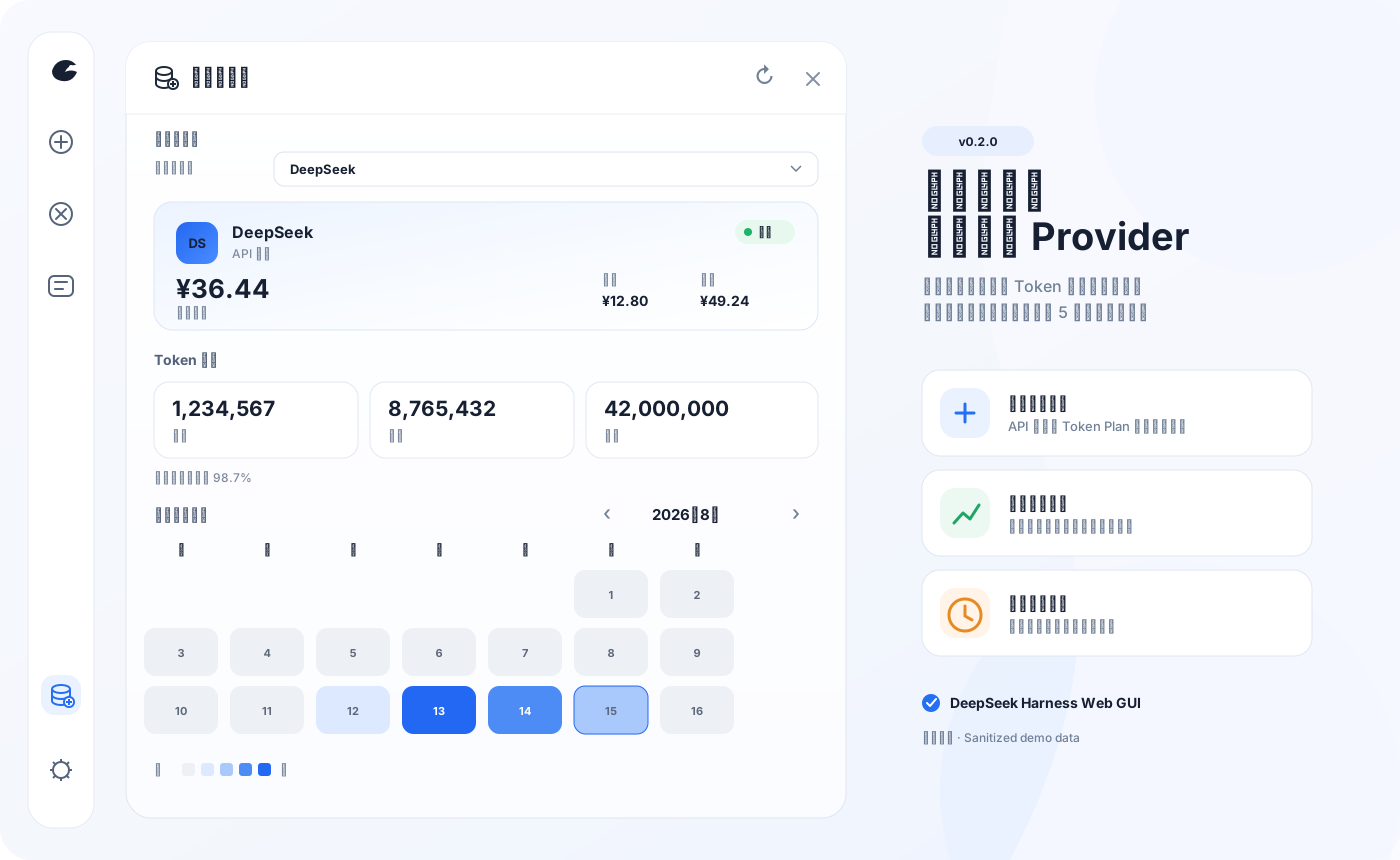
展示图使用脱敏演示数据;插件不会把 API Key、Cookie、管理 PAT 或上游原始响应发送到浏览器。
一眼看懂 / At a glance
| 能力 | 说明 | |
|---|---|---|
| 💳 | 统一账户卡片 | API 供应商显示余额,Token Plan 显示分窗口额度;面板一次只呈现当前供应商 |
| 📊 | Token 用量分析 | 今日、本月、累计、缓存命中率、月历热图,以及按日期/供应商/模型下钻 |
| 🔄 | 后台监测 | 服务端启动即刷新,之后每五分钟更新全部已配置账户与本地 Token 聚合 |
| 🧩 | 可扩展适配器 | 支持 New API、Sub2API、通用余额模板,以及声明式 JSON Pointer 自定义查询 |
| 🔒 | 本机安全边界 | 五个端点仅接受回环 GET;凭据只在服务端解析并发往校验后的供应商地址 |
界面支持中文和英文。浏览器只请求当前选择的 provider;后台刷新与面板是否打开无关。手动刷新会更新用量、供应商列表,并强制刷新当前账户,不会批量强制请求其他供应商。
快速安装 / Quick start
需要 DeepSeek Harness web profile(@deepseek-ai/dsh >= 0.1.0-rc.6)。
dsh plugin --profile web add "github:Ychris12138/dsh-usage-stats"
然后重启已经运行的 dsh web,并在浏览器中硬刷新。侧边栏底部会出现“用量/余额”(Usage/Balance)入口。
升级或卸载:
dsh plugin --profile web update dsh-usage-stats
dsh plugin --profile web remove dsh-usage-stats
兼容安装器:无法使用 dsh plugin 时展开
PowerShell、命令提示符和 macOS/Linux 终端使用同一条命令:
npx --yes github:Ychris12138/dsh-usage-stats
安装器会把运行文件复制到 ~/.dsh/profiles/node_modules/dsh-usage-stats,并在 profiles/web/cordis.patch.yml 中幂等启用插件。重复运行即可更新,不会重复追加配置。设置了 DSH_HOME 时使用该目录。
dsh plugin 与 npx 是两条独立安装路径,请选择其中一种;不要同时保留手工 Cordis entry 和 bundle 注册,否则会重复挂载。
# 预览,不修改文件
npx --yes github:Ychris12138/dsh-usage-stats --dry-run

# 检查现有安装
npx --yes github:Ychris12138/dsh-usage-stats --check

# 安装但不修改 Cordis patch
npx --yes github:Ychris12138/dsh-usage-stats --no-enable
无法使用 npx 时可从源码运行 node scripts/install.mjs。
支持的账户类型 / Providers
插件自动发现官方 DeepSeek 路由和 llm-pi-ai 中的 provider profile。只有存在公开账户接口或显式 monitor 的供应商才会查询远端账户;Token 用量统计不需要额外凭据。
| Provider / adapter | 模式 | 默认凭据 | 上游接口 |
|---|---|---|---|
| DeepSeek | 余额 | provider apiKeyEnv | /user/balance |
| OpenRouter | 余额 | OPENROUTER_MANAGEMENT_KEY | /api/v1/credits |
| Moonshot / Kimi API | 余额 | provider apiKeyEnv | /v1/users/me/balance |
| OpenCode Go | 订阅 | OPENCODE_GO_API_KEY 或本地 auth.json | /zen/go/v1/usage |
| Z.ai / 智谱 | 订阅 | ZAI_API_KEY | Coding Plan quota/subscription |
| Kimi For Coding | 订阅 | KIMI_API_KEY | /coding/v1/usages |
| MiniMax Coding Plan | 订阅 | MINIMAX_API_KEY | /v1/token_plan/remains |
| New API | 余额 | provider 推理 Token | /api/usage/token/ |
| Sub2API / Passion | 自动判别 | provider apiKeyEnv | /v1/usage |
| General / Declarative | 余额或订阅 | 配置中的 credential ref | 受限 GET + JSON |
没有公开账户接口的供应商仍会正常统计 Token;账户卡片会明确显示“不支持”,不会猜测余额。
凭据与供应商配置 / Configuration
凭据由 Harness 从 ~/.dsh/.credentials.yaml 解析。安装器不会读取、创建或修改该文件。不要把真实 Key、Cookie 或管理令牌提交到 Git、公开 issue,或粘贴给编码 Agent。
余额型供应商
DeepSeek、Moonshot 等默认复用对应 provider profile 的 apiKeyEnv。例如:
# ~/.dsh/.credentials.yaml
DEEPSEEK_API_KEY: sk-your-key-here
OpenRouter 是明确的例外:官方账户 credits 接口要求 Management Key,不能复用普通推理 OPENROUTER_API_KEY。插件默认读取独立引用;未配置时显示“未配置”,不会拿推理 Key 试探:
# ~/.dsh/.credentials.yaml
OPENROUTER_MANAGEMENT_KEY: sk-or-v1-your-management-key
插件按 total_credits - total_usage 显示 OpenRouter 余额,并同时展示累计已用和总 credits。普通 Key 的 /api/v1/key 只描述单个 Key 的 spending limit,不会被当作账户余额。自定义引用可在 monitors.openrouter 中设置 adapter: openrouter-balance 与 credentialRef。
Token Plan 供应商
# ~/.dsh/.credentials.yaml
OPENCODE_GO_API_KEY: sk-opencode-your-key
ZAI_API_KEY: your-zai-key
# 中国区 Z.ai 用户可选;默认 global
ZAI_API_REGION: bigmodel-cn
KIMI_API_KEY: your-kimi-key
MINIMAX_API_KEY: your-minimax-key
# 中国区 MiniMax 用户可选;默认 global
MINIMAX_API_REGION: cn
OpenCode Go 依次尝试 Harness credential、~/.local/share/opencode/auth.json,最后才使用显式 OPENCODE_GO_AUTH_COOKIE + OPENCODE_GO_WORKSPACE_ID 兼容回退。Bearer usage endpoint 目前不是公开 API,可能随上游变化;Cookie 等同登录凭据,不应进入日志或 issue。
Z.ai 全球区使用 api.z.ai,中国区使用 open.bigmodel.cn。MiniMax 优先使用官方 www.minimax.io / www.minimaxi.com Token Plan 地址,并解析 5 小时与周窗口的剩余比例和重置时间。
New API、Sub2API 与自定义 monitor
在现有 name: dsh-usage-stats Cordis entry 下合并 config,不要追加第二个插件 entry。monitor 键必须是 Harness 中真实存在的 provider id;未知 provider、adapter 或非法映射会在路由和 timer 注册前阻止插件启动。
展开 monitor 配置示例
New API 默认用 provider 推理 Token 查询 /api/usage/token/,并从 /api/status 读取实例自己的 quota_per_unit:
# ~/.dsh/profiles/web/cordis.patch.yml
- insert:
    - id: usage-stats
      name: dsh-usage-stats
      config:
        monitors:
          relay-a:                 # Harness provider id
            adapter: new-api
            # 仅旧实例的 /api/user/self 回退需要:
            fallbackCredentialRef: RELAY_A_MANAGEMENT_PAT
只有 /api/usage/token/ 返回 404/405 且配置了独立管理 PAT 才会 fallback;不会把推理 Token 当管理凭据。旧实例需要 User ID 时可增加 fallbackUserIdRef。
CC Switch 风格通用余额:
        monitors:
          relay-a:
            adapter: general
            warning:
              warnBelow: 5
              criticalBelow: 1
Sub2API 风格 /v1/usage:
        monitors:
          relay-a:
            adapter: sub2api
            warning:
              warnBelow: 5
              criticalBelow: 1
Passion(provider id 为 passion 或域名为 *.passionapi.com)会自动识别。钱包响应显示余额;quota_limited 或包含 subscription 的响应自动切换为额度窗口。
声明式自定义查询只支持受限 GET + JSON Pointer,不执行 JavaScript:
        monitors:
          private-model:
            adapter: declarative
            mode: balance
            request:
              path: /account/balance
              auth:
                type: bearer
                credentialRef: PRIVATE_MODEL_API_KEY
            extract:
              root: /data
              remaining: /available_balance
              used: /used_balance
              total: /total_balance
              currency: /currency
支持的 adapter:deepseek-balance、openrouter-balance、moonshot-balance、zai-balance、new-api、sub2api、general、opencode-go、zai-token-plan、kimi-token-plan、minimax-token-plan、declarative。
warning.warnBelow 与 warning.criticalBelow 是余额绝对值阈值。具有总额度的余额和 Token Plan 会自动产生 normal / warning / critical 剩余比例状态(默认 30% / 10%)。
使用 / Usage
- 点击侧边栏“用量/余额”。
- 用“当前供应商”切换账户卡片;一次只显示一个 provider。
- 使用
‹/›切换月份,点击热图日期查看当天的 provider/model 明细。 - 标题栏刷新会更新 Token、provider 列表,并强制刷新当前账户。
“最近 14 天”按本地日历计算,只显示窗口内存在用量的日期;未来时间戳不会计入。同一模型来自不同 provider 时会分别统计,例如 deepseek-official · deepseek-chat 与 ark · deepseek-chat。
Agent 友好安装 / Agent-friendly installation
复制给 Codex、Claude Code 或其他本地编码 Agent
Install or update dsh-usage-stats from:
https://github.com/Ychris12138/dsh-usage-stats

Constraints:
- Resolve DSH_HOME from the environment; otherwise use ~/.dsh.
- Do not read, print, edit, or request .credentials.yaml, auth.json, cookies, or any API key.
- Do not expose the plugin through a reverse proxy.
- Do not restart or terminate an existing dsh process without asking me.

Procedure:
1. Confirm node, npx, and dsh are available.
2. Prefer `dsh plugin --profile web update dsh-usage-stats` when already installed; otherwise use `dsh plugin --profile web add "github:Ychris12138/dsh-usage-stats"`.
3. If unavailable, use: npx --yes github:Ychris12138/dsh-usage-stats
4. Do not combine bundle installation with an existing manual dsh-usage-stats Cordis entry.
5. For npx, require a verified package and exactly one Cordis entry, then run again with --check.
6. Report the installation path and resolved profile paths.
7. If dsh web is running, report that a restart is needed and stop.

Optional account setup (never handle secret values yourself):
- OpenRouter account balance requires OPENROUTER_MANAGEMENT_KEY, not the inference key.
- OpenCode Go may reuse local auth.json or use OPENCODE_GO_API_KEY.
- Z.ai uses ZAI_API_KEY; China accounts may set ZAI_API_REGION=bigmodel-cn.
- Kimi and MiniMax use KIMI_API_KEY and MINIMAX_API_KEY.
- Never ask me to paste a key or browser cookie into chat.

Optional monitor setup:
- Read configured Harness provider ids and ask which id should receive a monitor.
- Add only non-secret config under the existing dsh-usage-stats Cordis entry.
- Store credential reference names, never credential values.
- Validate relative request.path and JSON Pointer fields beginning with /.
- Do not enable cross-origin, insecure HTTP, or private-network access unless I explicitly request it.
只获准检查而不能修改时运行:
npx --yes github:Ychris12138/dsh-usage-stats --check
安装器退出码:未知参数返回 2;文件、版本或配置验证失败返回非零;成功时输出已验证版本、安装目录和 patch 路径。Agent 无需自行解析或重写 YAML。
隐私与安全 / Privacy & security
- API Key、OpenCode
auth.json、Cookie 与管理 PAT 不会进入浏览器响应、插件缓存或日志。 - 自定义 monitor 默认要求 HTTPS、同源相对路径、手动 redirect 和 JSON 响应,body 上限为 1 MiB。
- 发凭据前会筛选域名的 IPv4/IPv6 解析结果并固定一个允许的连接地址,优先使用公网地址;HTTPS 域名解析到
198.18.0.0/15时可作为 Clash/Mihomo 等代理的 synthetic fake-IP 使用。字面量198.18/15、其他私网/特殊地址仍默认拒绝,防止 DNS rebinding 绕过私网限制。 usageBaseURL禁止内嵌 username/password;Authorization、X-API-Key、API-Key等 header 必须由 credential ref 注入。- 五个端点仅接受 GET,并同时校验 peer socket 与 Host;支持 IPv4、IPv4-mapped IPv6 和
[::1]:port。 - 用量缓存
~/.dsh/storages/usage-stats-cache.json只保存聚合 Token、会话 id、不透明 revision 与折叠游标,不保存提示词、回复或文件路径。
本机反向代理会让插件看到代理自身的回环地址。请勿把端点经反向代理暴露到局域网或公网;确需代理时必须在代理层增加可靠认证与访问控制。安全问题请按 SECURITY.md 私下报告。
正确性与数据口径 / Correctness
统计值来自 assistant/chunk 或 assistant/message 中 provider-reported usage,不是本地估算。相同 turn/step 的后续样本会替换旧样本,并按 provider/model 归集。
- 活跃会话只处理新追加事件。
- 持久化会话使用不透明 revision;未变化时不重复读取日志。
- seq 缺口、日志重写或 live/persisted 切换时完整重折叠该会话。
- 聚合采用 single-flight,并在同一临界区原子保存缓存。
validate:live会逐会话比较 raw artifact、session.history、插件端点与官方 token projection;缺文件或不一致会返回非零。
API
| Method | Path | Response |
|---|---|---|
GET | /api/usage-stats/usage | 按日期/provider/model 聚合的 Token 与缓存命中率 |
GET | /api/usage-stats/providers | provider 列表、account mode、adapter、状态与预警摘要 |
GET | /api/usage-stats/account?provider=<id> | 当前 provider 的统一余额或 Token Plan 快照;refresh=1 强制刷新 |
GET | /api/usage-stats/balance?provider=<id> | 0.1.x 余额兼容路由 |
GET | /api/usage-stats/subscriptions | 0.1.x Token Plan 兼容路由 |
非 GET 返回 405,非回环请求返回 403;所有响应均为 JSON 并带 Cache-Control: no-cache。
开发与验证 / Development
npm install
npm run check
npm test
npm pack --dry-run
npm test 完全离线,覆盖 bundle、客户端渲染与请求竞态、服务端安全边界、余额/Token Plan adapter、缓存和安装器幂等性。真实数据验证需先运行 dsh web:
npm run validate:live
node scripts/check-balance.mjs
所有服务端脚本均遵循 DSH_HOME。check-balance.mjs 可能显示真实余额,不要把输出粘贴到公开 issue。
兼容性与致谢 / Compatibility & credits
当前版本为 0.2.0。插件依赖 Harness 客户端模块加载器、Cordis 服务与 session persistence;Harness 预发布接口变化时可能需要同步适配。
- Javis603/token-monitor:参考多 provider 配额归一化与 Z.ai 限额解析。
- xiaoqi20/dsh-opencode-go-usage:参考 DSH 凭据接入、OpenCode
auth.json回退与 Bearer usage endpoint。
本项目重新实现统一 account protocol、adapter 与单供应商 UI,不复制参考项目界面。
License
Project files and signals
Shown items are public repository signals detected in the directory snapshot.
Repository information
- Language
- JavaScript
- License
- MIT
- Latest release
- v0.2.1
- Last updated
- Aug 17, 2026, 8:35 AM
Install deliberately
Review source code, permissions, lifecycle hooks, dependencies and network access. Test untrusted plugins in an isolated environment.