Installation
npx @deepseek-ai/dsh plugin --profile web add dsh-diff-approvalThis command is generated from the GitHub repository address. Inspect the upstream README and source before running it; pin a release or commit when reproducibility matters.
README
Maintainer-authored documentation snapshot.
dsh-diff-approval
English | 中文


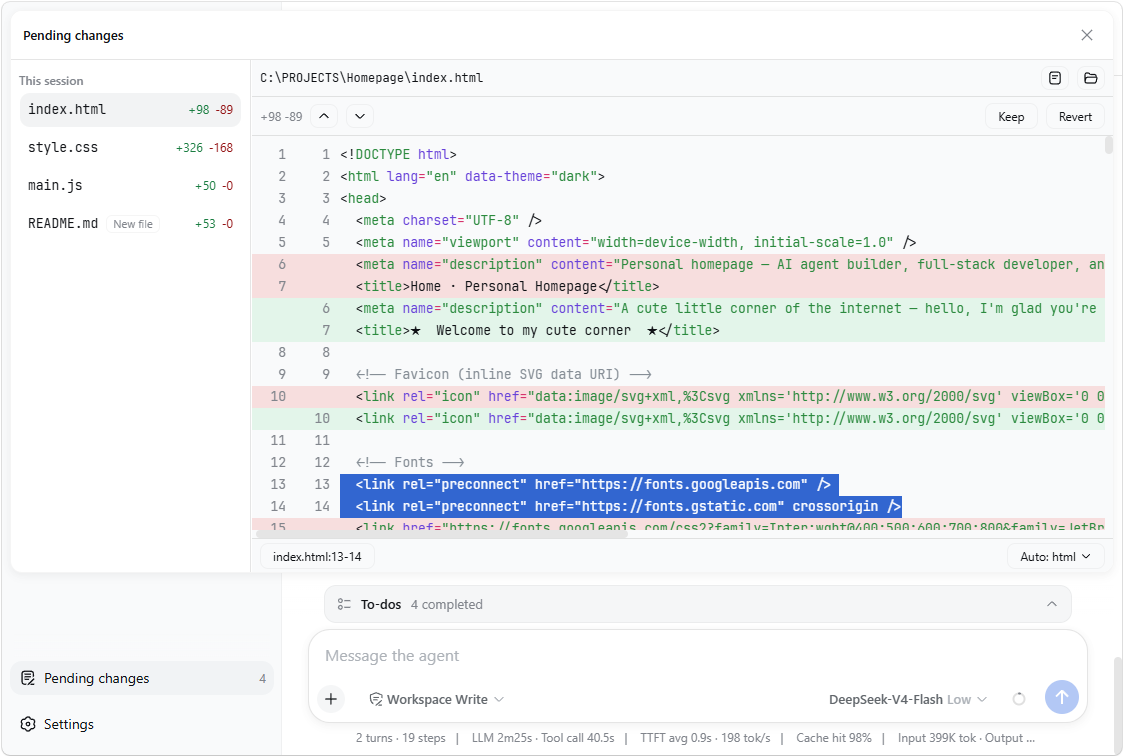
A DeepSeek Harness (DSH) plugin for pending-change review: it automatically tracks every successful edit, write, and editor (str_replace_editor) mutation, folds all unhandled changes into one entry per file, and shows each file's diff with Keep/Revert in the sidebar — no git involved.
✨ Features
- Diff view: syntax-highlighted diff with +/− counts and change-block jump (previous/next diff). Select text in the diff and the bottom status bar shows its
file:start-endreference — click it (or pressCtrl+L) to copy. - Highlight language: the diff's status bar picks the highlight language — auto-detected from the file extension (shown as "Auto: …"), or overridden manually from the dropdown.
- Keep / Revert: one decision per file. Keep accepts the changes; Revert writes the file back to its earliest basis (a created file is removed, a deleted tracked file is restored).
- Open / Reveal: open a file in its default app, or reveal it in the file manager, right from the diff header.
- Persistence: pending state is stored per workspace at
<dshHome>/diff-approval/workspaces/<workspaceId>.jsonand survives restarts — unhandled changes are still there when you come back, even in a fresh session.
📦 Install
If dsh is on your PATH:
dsh plugin --profile web add dsh-diff-approval
Or, if you run the harness through npx (e.g. npx @deepseek-ai/dsh web):
npx @deepseek-ai/dsh plugin --profile web add dsh-diff-approval
or manually: add the package to your profile's package.json dependencies and insert this row into the profile's cordis.patch.yml:
- insert:
    - id: diff-approval
      name: dsh-diff-approval
      # Optional: relocate durable pending state (defaults to
      # <dshHome>/diff-approval/workspaces).
      # config:
      #   storageDir: ~/dsh-pending
Then restart dsh web.
🚀 Usage
- Work with the agent as usual — successful
edit/writecalls are recorded automatically. - Click the Pending changes action at the sidebar footer (the badge shows the count).
- Click a file row to expand its full diff; use Previous diff / Next diff to jump between change blocks. Select text and click the reference in the bottom status bar (or press
Ctrl+L) to copy a line reference. - Keep accepts the file's changes; Revert restores its earliest basis. The row then leaves the list.
📝 Notes
- Only tracked mutations (
edit,write, andstr_replace_editoreditor calls) are recorded. Deletions made outside these tools (e.g. shellrm) are sensed only for tracked files: the entry turns "File is gone" and its Revert restores the file. - Reverting a created file deletes it (the fs seam has no delete API).
- Sessions with no workspace keep their entries memory-only; corrupt persistence files are rejected and can be deleted to reset.
🛠 Development
corepack pnpm install
pnpm run typecheck   # tsc over both faces
pnpm run build       # emits lib/index.js and lib/client.js
pnpm test
Project files and signals
Shown items are public repository signals detected in the directory snapshot.
Repository information
- Language
- TypeScript
- License
- MIT
- Latest release
- v0.4.0
- Last updated
- Aug 17, 2026, 5:34 PM
Install deliberately
Review source code, permissions, lifecycle hooks, dependencies and network access. Test untrusted plugins in an isolated environment.